10 Best Linux Desktop Environments in 2026 (My Picks)
If you’re going to spend hours every day staring at a screen, how much does experience matter? Not yours. The experience behind the software you’re trusting with your workflow.
I’ve written before about choosing the best Linux distro, and one thing I keep coming back to is longevity. Distributions like Debian, Fedora, Arch, and Ubuntu have earned trust through decades of active development. Your desktop environment deserves the same standard.
Every desktop environment and window manager here has at least ten years of development behind it and, at the time of writing, remains available and supported across major Linux distributions.
I didn’t want a list of shiny new projects that might disappear in a few years. I wanted proven tools that have survived changing trends, survived the X11 to Wayland transition (or are navigating it honestly), and still offer something genuinely distinct in 2026.
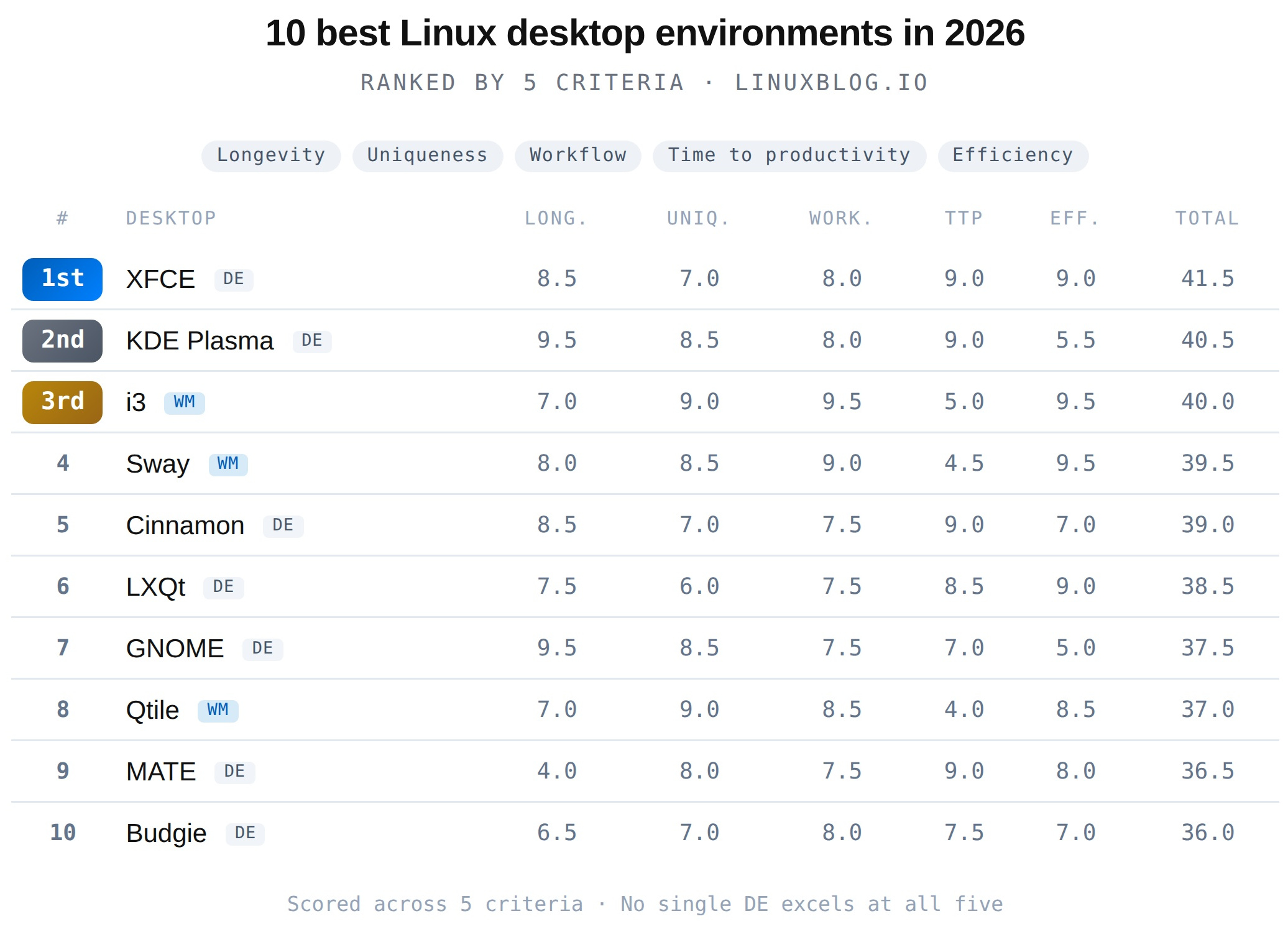
Disclosure: I daily drive two of these: GNOME on my workstation and i3 on my laptop. I’ve also tested all of these over the past decade. To keep things structured, I scored each entry across five criteria and ranked them ascending from #10 to #1. First, the criteria.
The 5 Criteria
I wanted a framework that would hold up to scrutiny, not just a vibes-based ranking. Each desktop environment was scored across five criteria:
1. Longevity and Active Development. Ten years of history is the minimum, but history alone isn’t enough. Is the project still actively maintained? Is there a healthy contributor base, or is it running on fumes? Are releases still shipping? This criterion looks both ways: it rewards a proven track record, but it also asks whether the project is positioned to survive the next decade. A desktop environment navigating the Wayland transition with a clear plan scores higher here than one with a longer history but no path forward.
2. Uniqueness of Approach. Every entry on this list should offer something you can’t get elsewhere. If two desktops feel interchangeable, one of them is scored as less unique. This scores how distinct the experience is, whether that’s a unique workflow model, a unique interface philosophy, or a unique technical approach.
3. Workflow Efficiency. How well does this desktop stay out of your way and let you work? Does it help you move faster, or does it create friction? This favors environments that are opinionated about productivity, whether that’s keyboard-driven tiling or a polished traditional desktop that just works.
4. Time to Productivity (TTP). How long from first login to a desktop you’re comfortable and productive in? A desktop that’s incredible after 40 hours of configuration scores differently here than one that works perfectly out of the box. Both approaches are valid, but this criterion measures the ramp-up cost honestly.
5. Efficiency. Getting the most polish, features, and power out of the least resources. A lightweight desktop that delivers a complete experience scores higher than a heavy one that demands modern hardware just to feel smooth. This is a ratio, not just a raw performance number.
No single desktop excels at all five. Every entry on this list has at least one weakness. That’s the point: the best desktop environment is the one whose tradeoffs align with your priorities.
The Rankings
Here’s how each entry scored across the five criteria, out of 10. The total determines the overall ranking.
| # | Desktop | Long. | Uniq. | Work. | TTP | Eff. | Total |
|---|---|---|---|---|---|---|---|
| 1st | XFCE DE | 8.5 | 7.0 | 8.0 | 9.0 | 9.0 | 41.5 |
| 2nd | KDE Plasma DE | 9.5 | 8.5 | 8.0 | 9.0 | 5.5 | 40.5 |
| 3rd | i3 WM | 7.0 | 9.0 | 9.5 | 5.0 | 9.5 | 40.0 |
| 4 | Sway WM | 8.0 | 8.5 | 9.0 | 4.5 | 9.5 | 39.5 |
| 5 | Cinnamon DE | 8.5 | 7.0 | 7.5 | 9.0 | 7.0 | 39.0 |
| 6 | LXQt DE | 7.5 | 6.0 | 7.5 | 8.5 | 9.0 | 38.5 |
| 7 | GNOME DE | 9.5 | 8.5 | 7.5 | 7.0 | 5.0 | 37.5 |
| 8 | Qtile WM | 7.0 | 9.0 | 8.5 | 4.0 | 8.5 | 37.0 |
| 9 | MATE DE | 4.0 | 8.0 | 7.5 | 9.0 | 8.0 | 36.5 |
| 10 | Budgie DE | 6.5 | 7.0 | 8.0 | 7.5 | 7.0 | 36.0 |
Now let’s get into why each one landed where it did. We’re counting up from #10.
#10 Budgie
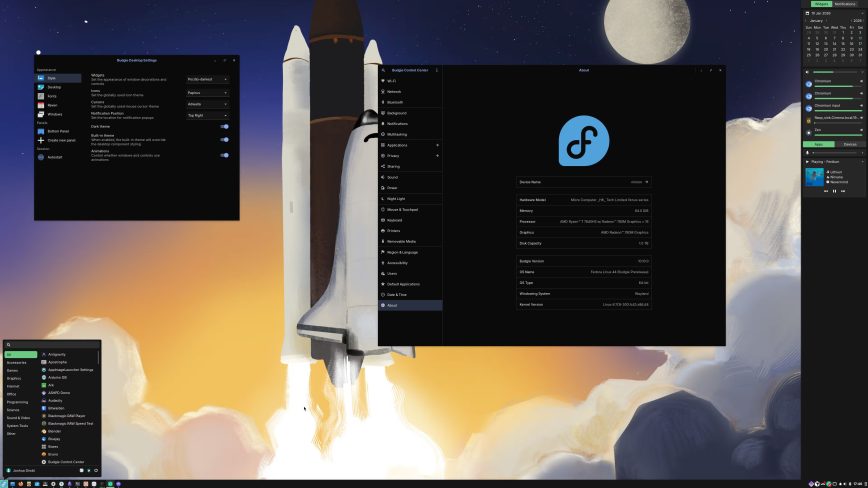
Budgie has had a turbulent journey. Born inside the Solus project in 2013, it survived its creator’s departure, a full organizational split in 2022 when lead developer Joshua Strobl left Solus to form the independent Buddies of Budgie organization, and a complete architectural pivot from X11 to Wayland. Budgie 10.10, released in January 2026, is now Wayland-only, and development has shifted toward Budgie 11, a ground-up rewrite in Qt6 and C++.
That ambition is exactly why Budgie is on this list, and also why it’s at #10. The Wayland migration shows genuine commitment to the future. The Raven sidebar for notifications and quick settings is a genuinely useful interface element that no other DE replicates quite the same way. And when it works, Budgie feels clean and purposeful.
But the team is tiny. Budgie’s future depends heavily on one lead developer’s sustained energy, a small supporting team, and a Qt6 rewrite that hasn’t shipped yet. The history of pivots, from GTK to a briefly considered EFL move, back to GTK for 10.x, and now Qt6 for 11, introduces uncertainty that the larger projects on this list don’t carry.
If Budgie 11 delivers, this ranking will look conservative in hindsight. If it stalls, Budgie could fade. For now, it earns its spot as the most ambitious underdog on the list.
#9 MATE Desktop
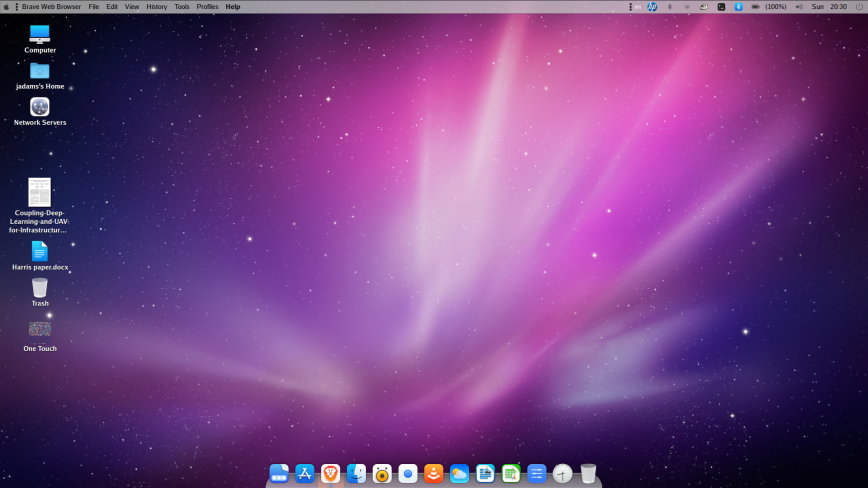
Screensot by: Jaymo via linuxcommunity.io.
This one is now personal. A whole group of MATE Desktop users recently moved their support forums to LinuxCommunity.io, and I’ve seen firsthand how dedicated this community is. MATE carries forward the GNOME 2 desktop experience, and in 2026, it’s the only environment that still defaults to the classic dual-panel layout: applications menu and indicators up top, taskbar and workspace switcher on the bottom. That’s not nostalgia. That’s a genuinely distinct workflow that a lot of people still prefer.
If this list were scored on everything except longevity, MATE would comfortably sit in the top five. It shines on time to productivity and efficiency with resources. The dual-panel layout is instantly familiar to anyone who used Linux in the GNOME 2 era, and it works without a bunch of configuration changes.
But we can’t ignore what’s happening upstream. The MATE Desktop project has struggled with developer attrition. Release infrastructure knowledge has been lost. MATE 1.28 still hasn’t fully landed in Debian and Ubuntu due to packaging issues. And in March 2026, Ubuntu MATE founder Martin Wimpress announced he’s stepping back after twelve years, stating openly that he’s lost the passion.
There will be no Ubuntu MATE 26.04 LTS release. As OMG! Ubuntu noted, this isn’t unique to MATE: Lubuntu is effectively in maintenance mode, and Ubuntu Unity’s lead also stepped back last year. Smaller community-driven flavors are feeling the pressure across the board.
This matters because open source projects live and die by their contributors. We’ve seen it before with other tools that seemed permanent. If you use MATE and value it, now is the time to contribute, whether that’s code, packaging, documentation, or just showing up in the community. Projects like this don’t survive on appreciation alone. They survive when people step up. Join the discussion about desktop environments and the future of MATE on our LinuxCommunity.io forums.
#8 Qtile
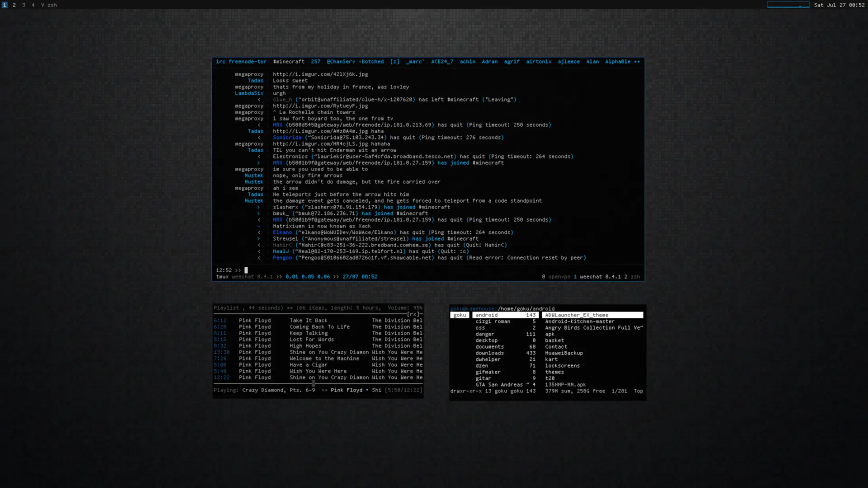
Qtile is a tiling window manager configured entirely in Python. Not a Python-like config syntax. Actual Python. Your configuration file is a Python script with full access to the language’s standard library, third-party packages, and Qtile’s own API. You can write functions that dynamically assign windows to workspaces based on arbitrary logic. You can create custom widgets in a few lines. You can hook into window events and run whatever code you want.
Few window managers allow configuration as full-blown Python programming. The tradeoff is obvious: if you’re not comfortable writing Python, Qtile isn’t for you. The Time to Productivity (TTP) score reflects that. You’re not just learning keybindings. You’re writing code.
But for Python developers who also happen to be Linux users, and there are a lot of those, Qtile is a revelation. Version 0.35.0 shipped in March 2026. It supports both X11 and Wayland, which puts it ahead of i3 on the display server question. The community is small but active, and the documentation is solid.
Qtile scores 3rd in workflow efficiency because once your config is dialed in, the keyboard-driven tiling experience is exceptional. It’s the most hackable window manager on this list, and for the right user, that’s worth every minute of setup time.
#7 GNOME
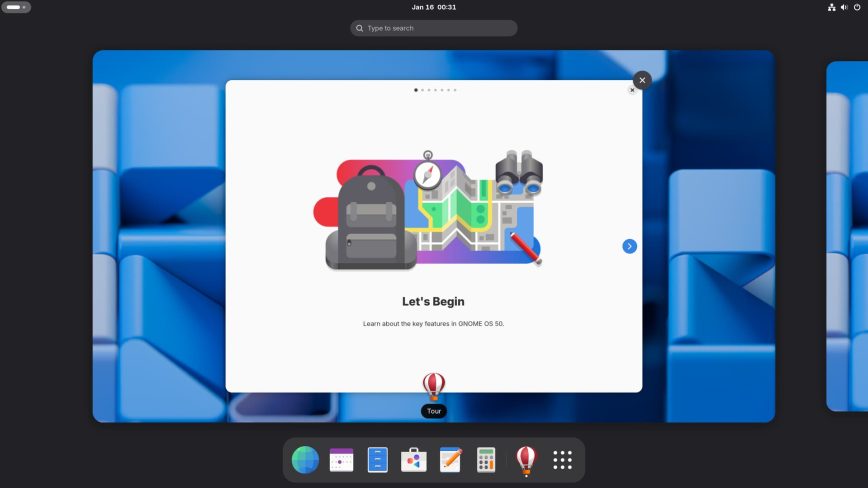
GNOME at #7 in a list of desktop environments will raise eyebrows. It’s the default on Ubuntu, Fedora, Debian, and RHEL. It has corporate backing from Red Hat. It received a million euros from Germany’s Sovereign Tech Fund. GNOME 50 shipped in March 2026 with VRR enabled by default, fractional scaling, and a fully Wayland only session with X11 code removed entirely. By any measure of longevity and institutional support, GNOME is untouchable.
So why #7? Because this list measures five things, and GNOME excels at two while struggling with three.
GNOME’s Activities overview and workspace-driven navigation is genuinely unique. No other major DE takes the “no desktop icons, no persistent taskbar, gesture-driven workspace switching” approach. Love it or hate it, it’s distinctive and opinionated. That earns strong uniqueness and longevity scores.
Where GNOME falls is efficiency and workflow. I use GNOME daily on my workstation, and I use it with extensions. That’s the problem. Vanilla GNOME ships without a Dash to dock, without desktop icons, without a system tray in the traditional status icons.
To get a workflow most people consider productive, you generally need a few more extensions on top. I actually see that as a strength, GNOME doesn’t choose for you. But many users find it too bare out of the box, and that’s a fair criticism.
That’s additional setup time, additional maintenance when GNOME updates break extensions, and additional complexity for what should be basic desktop functionality. The extensions ecosystem is powerful, but depending on third-party add-ons built by the community as core features is a design choice that costs GNOME points here.
Resource usage is the other penalty. GNOME is one of the heavier options on this list. For what you get out of the box without extensions, that’s a steep price. GNOME is an excellent desktop for people who buy into its workflow philosophy completely and enjoy its motion/animation. But in a ranking that measures the full picture, the gaps are real.
#6 LXQt
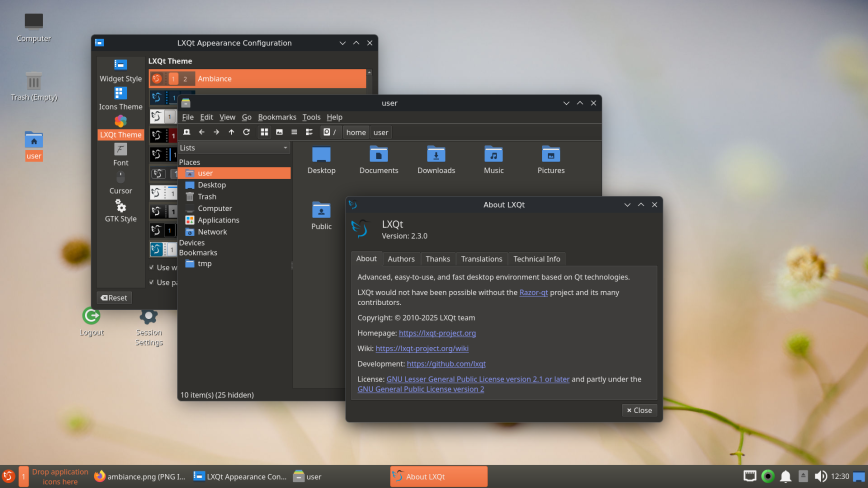
LXQt is the quiet overachiever. Born in 2013 from the merger of LXDE and Razor-qt, it took the lightweight desktop concept and rebuilt it on the Qt framework. The result is one of the most resource-efficient full desktop environments available on Linux. In 2026 benchmarks, LXQt is on par with XFCE memory usage and far better than GNOME and KDE Plasma.
Version 2.3.0 shipped in November 2025, with point releases continuing through April 2026. Wayland support has been steadily improving, with sessions working under Labwc, Wayfire, and KWin. The project maintains a healthy twice-yearly release cadence, and Lubuntu 26.04 LTS ships with LXQt as its default desktop. That’s an LTS backing that some entries higher on this list can’t claim.
LXQt’s weakness is distinctiveness. It scores last in uniqueness because the desktop experience is a traditional panel, menu, and file manager setup that doesn’t push any boundaries. PCManFM-Qt is fast and functional. The panel is configurable. Everything works. But nothing about LXQt makes you stop and think “I couldn’t get this anywhere else.”
It’s the lightweight DE you choose when you want maximum efficiency and minimum fuss, and there’s genuine value in that. It just doesn’t score as high in a ranking that rewards standing out.
#5 Cinnamon
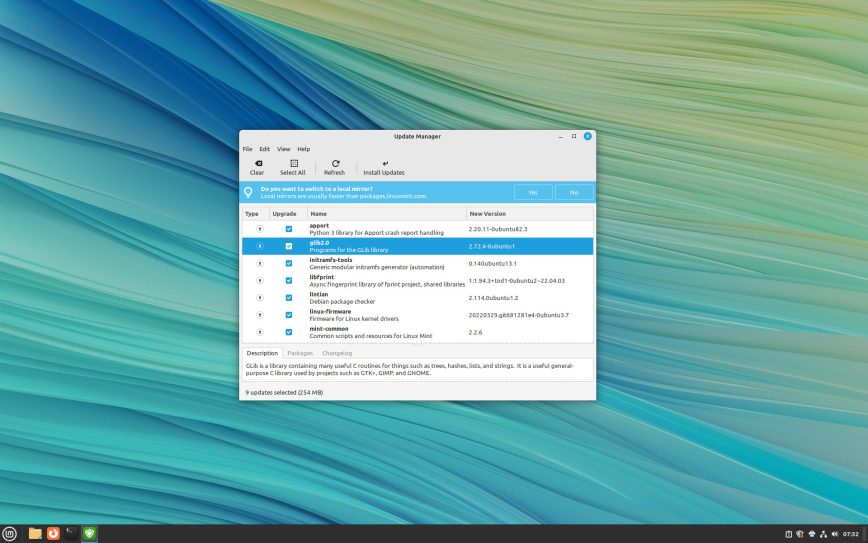
Cinnamon ties for the highest Time to Productivity score on the list. If you’ve ever used Windows, you can sit down at a Cinnamon desktop and be working within minutes. Panel at the bottom, application menu on the left, system tray on the right. No learning curve. No configuration needed. It just works.
Developed by the Linux Mint team since 2011, Cinnamon forked from GNOME 3 but went in the opposite direction: instead of reinventing the desktop metaphor, it preserved it. Version 6.6 shipped in December 2025 with a redesigned application menu, improved keyboard handling, window tiling refinements, and Alt+Tab behavior that respects multi-monitor setups. The Mint team ships regular, polished updates, and Cinnamon’s future is as secure as Linux Mint’s, which is to say, very secure.
Cinnamon’s ceiling is also its limitation. It doesn’t score high on uniqueness because the traditional Windows-style layout is shared territory with XFCE and, to a degree, KDE Plasma’s defaults. The workflow is reliable but not innovative. Hot corners, desklets, and the Expo workspace view add nice touches, but the core experience is “familiar desktop done well” rather than “something you haven’t seen before.”
For many users, that’s exactly what they want. Cinnamon is the desktop that respects your muscle memory and stays out of your way.
#4 Sway
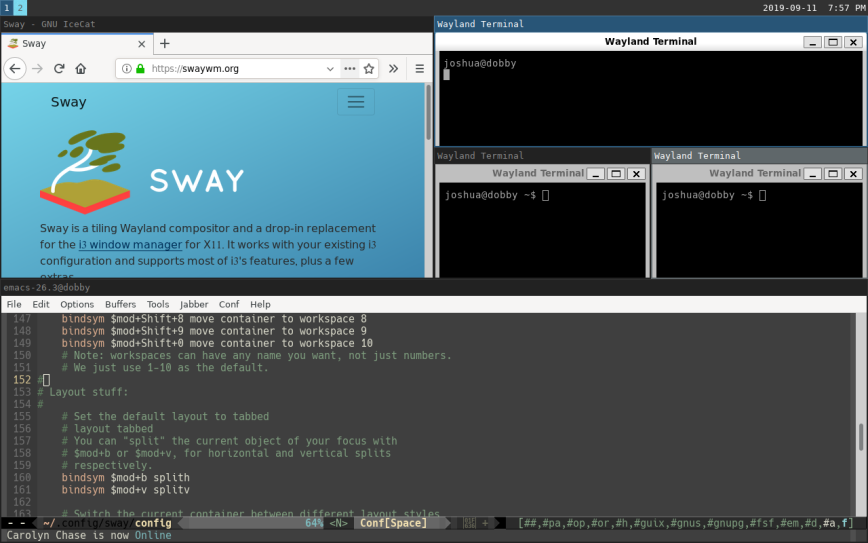
Sway is what happens when i3’s philosophy meets the Wayland future. It’s a tiling compositor that uses wlroots as its foundation and accepts your existing i3 configuration file with minimal changes. If you know i3, you already know Sway. If you don’t, the learning curve is identical.
Version 1.11 shipped in June 2025, and 1.12-rc1 arrived with HDR support, individual window capture, and new Wayland protocol support. The project has a Fedora Spin, 53 contributors on the 1.11 release alone, and over 16,000 GitHub stars. Sway isn’t just surviving. It’s accelerating.
Sway scores 2nd in workflow and ties for the highest efficiency score on the list alongside i3. The keyboard-driven tiling experience is fast, the resource footprint is minimal, and the Wayland-native architecture means better security, smoother rendering, and proper HiDPI support without workarounds.
Where Sway loses points is Time to Productivity. Like i3, you’re looking at a config file and a blank screen on first login. The documentation is good, and the i3 compatibility means a decade of community configs and guides apply, but the ramp-up is real.
The question Sway raises is whether it makes i3 obsolete. In some ways, yes: Sway does everything i3 does but on the display protocol that actually has a future. But i3’s community, documentation depth, and sheer inertia mean both will coexist for years.
#3 i3wm
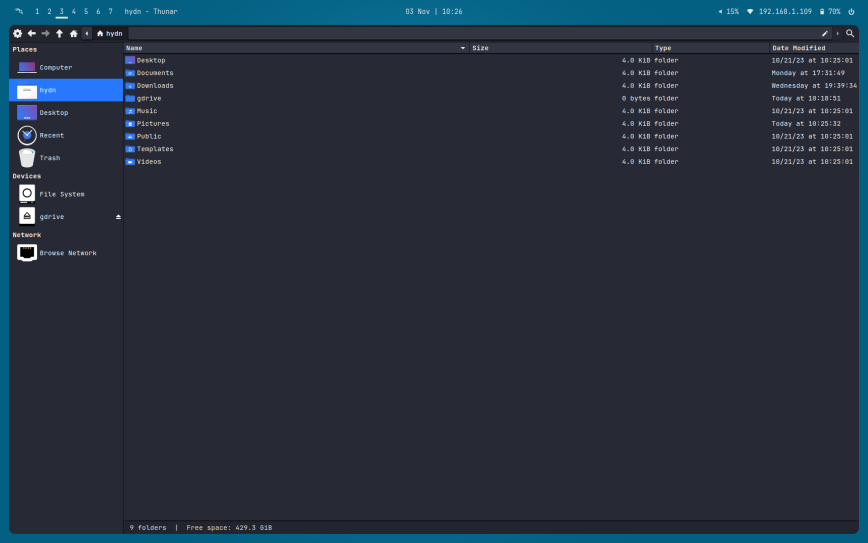
I’ve used i3 on my laptop for the past three or so years. It’s the window manager that taught me what tiling could be and more importantly, workspace switching. One main configuration file. Keyboard-driven everything. No animation overhead. No distractions. Just windows, workspaces, and work.
i3 ties for the top score in uniqueness (alongside Qtile), leads in workflow efficiency, and ties for the top efficiency score (alongside Sway). Seventeen years of development have produced something remarkably focused. The developers explicitly state they’re happy with the feature set and only accept changes that benefit many users without adding complexity. That philosophy is rare in software. Most projects chase features. i3 chases stability.
As one long-time user put it in a post titled The Unreasonable Effectiveness of i3: “Being boring with tools is great. It gives you the freedom to be revolutionary in areas where you actually want to make a difference.” That’s the i3 experience in one sentence.
The elephant in the room is Wayland. i3 is X11-only, and the developers have no plans to change that. When asked directly about i3’s future in a GitHub discussion, maintainer Michael Stapelberg was clear: “I don’t see a point in transitioning i3 to Wayland, given that sway exists.” That’s an honest position, but it means i3 has no path forward when X11 eventually becomes unsupportable on major distributions. GNOME 50 already removed X11 code entirely. KDE Plasma is deprecating its X11 session in early 2027. The timeline is long but the direction is clear.
That’s why i3’s longevity score takes a hit. It’s the only entry on this list with zero Wayland plans. Every other desktop or window manager here is either Wayland-native, transitioning, or at least experimenting. i3 chose not to.
This ranking reflects i3 as it is today, not where it will be in ten years. Right now, i3 delivers the best workflow efficiency score on this list and ties for the top marks in uniqueness and efficiency. But over the next decade, as X11 fades, Sway will overtake i3 on longevity alone. If you’re choosing between them today and plan to stay on your choice for years, Sway is the safer long-term bet. If you want the most refined, battle-tested tiling experience available right now and don’t mind eventually migrating, i3 still earns its place at #3.
#2 KDE Plasma
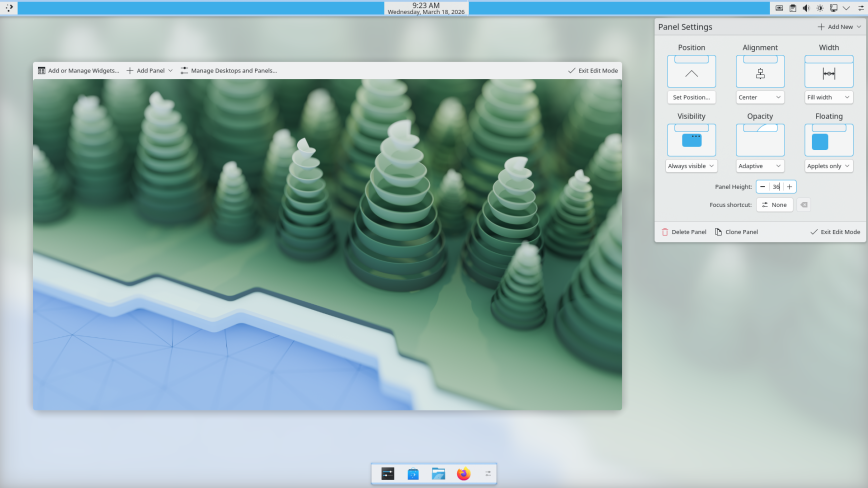
KDE Plasma is the most feature-complete desktop environment on Linux. That’s not an opinion. It’s a measurable fact. No other DE offers the breadth of built-in customization, the depth of the settings system, the range of bundled applications, or the scope of the KWin window manager.
Plasma 6.6, released in February 2026, brought OCR in screenshots, a new on-screen keyboard, selective window exclusion from screen recordings, and accessibility improvements including color-blind filters. The community raised over $400,000 in their 2025 end-of-year fundraiser. KDE is thriving.
Plasma ties for the highest longevity score on the list, alongside GNOME (both 9.5 out of 10). It scores among the top tier in uniqueness because the Activities system, KDE Connect, the Plasmoid widget ecosystem, and KWin scripting create a desktop experience no one else matches in scope.
Time to Productivity is strong because Plasma’s defaults are genuinely good: a sensible taskbar, a polished application menu, a capable file manager in Dolphin, and system settings that are deep but don’t demand your attention on day one.
The cost is resources. Plasma has the heaviest footprint on this list. That’s the price of “everything built in.” For systems with 16 GB or more, it’s irrelevant. On 8 GB, you’ll notice it. On older hardware, it’s a dealbreaker. That efficiency score of 5.5 out of 10, second lowest on the list, is honest. KDE gives you more than any other desktop, but it asks for more in return.
If you want one desktop that can do everything, look like anything, and integrate with your phone via KDE Connect, KDE Plasma is the answer. It’s the Swiss Army knife of Linux desktops. Just make sure your hardware can handle the blade count.
#1 XFCE
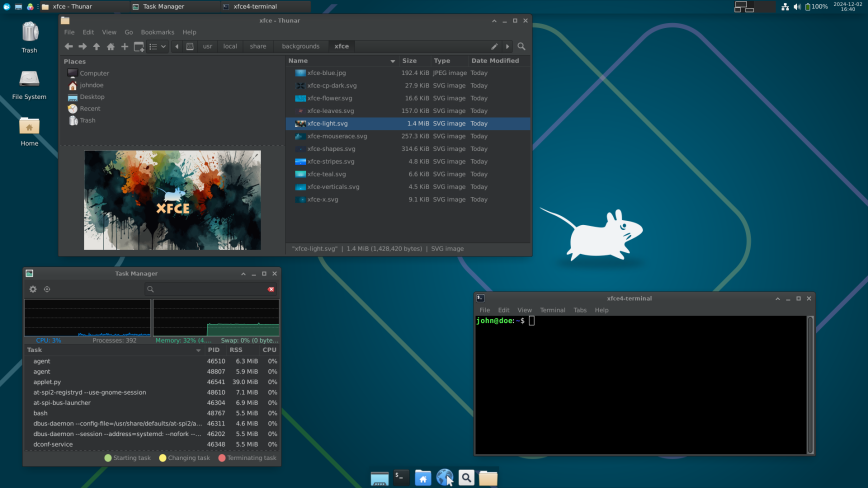
XFCE doesn’t dominate any single category. Look at the table. It ties for the top TTP score but doesn’t lead outright in longevity, uniqueness, workflow, or efficiency. And yet, it’s #1 overall. That tells you everything about what this ranking values: consistency.
XFCE has been around since 1996. Thirty years. In that time, it has never once tried to reinvent itself. It has never chased a trend. It has never shipped a release that broke its users’ workflows in pursuit of a new vision. It just quietly, incrementally, got better at being a lightweight, reliable, traditional Linux desktop.
XFCE 4.20, released in December 2024, brought experimental Wayland support through a new abstraction layer called libxfce4windowing. The Thunar file manager handles 100,000+ files without breaking a sweat. The panel system is flexible without being overwhelming. HiDPI support is now solid. And the whole thing idles at around 1 GB of RAM.
XFCE’s greatest strength is that it has no critical weakness. Every other entry on this list has at least one score that drags it down significantly. XFCE’s lowest score is 7.0 in uniqueness, and even that is generous, because “traditional desktop done right for three decades” is its own kind of unique. It doesn’t demand your attention. It doesn’t require extensions to be functional. It doesn’t need modern hardware to feel fast. It doesn’t force you to learn a new paradigm.
The Wayland transition is XFCE’s biggest open question. The 4.20 support is experimental, and XFCE doesn’t yet have its own Wayland compositor, relying on Labwc or Wayfire instead. The team has acknowledged this will be a “major effort.” But XFCE has earned the benefit of the doubt through three decades of steady, deliberate progress. If any project will get there on its own timeline without rushing or breaking things, it’s this one.
XFCE is the desktop equivalent of a tool that’s been in your workshop for twenty years. It’s not flashy. It’s not exciting. Some call it boring. But every time you reach for it, it’s right there, and it works. That’s why it’s #1!
Notable Mentions
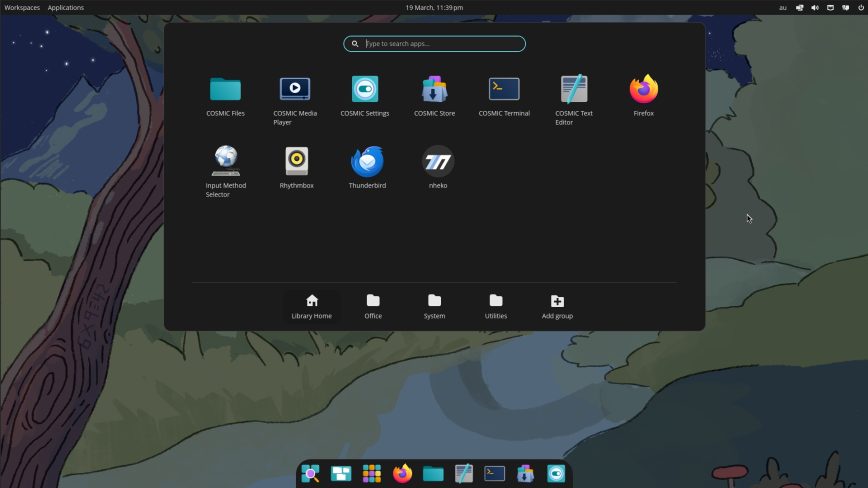
bspwm, Awesome, and dwm are all excellent tiling window managers with loyal communities, but each is X11-only with no Wayland successor, which kept them off the main list.
COSMIC Desktop is the opposite problem: it’s Wayland-native, built from the ground up in Rust by System76, and shipped its first stable release in late 2025. It hasn’t earned the ten years of development history this list requires, but everything about its trajectory suggests it will be a serious contender when we revisit these rankings.
Conclusion
No single desktop environment is good at everything. That’s the clearest takeaway from scoring all ten across five criteria. The #1 pick doesn’t dominate any single category. The most backed project on the list (GNOME) ranks 7th. i3 would rank higher if not for its X11-only stance, a gap that will only widen as Wayland becomes the standard.
The right choice depends entirely on what you value. If you want maximum efficiency and a keyboard-driven workflow, tiling window managers like i3, Sway, or Qtile are your territory. If you want a polished traditional desktop that just works, XFCE, Cinnamon, or KDE Plasma will serve you well. If you want the most opinionated workflow experience with institutional backing, GNOME is a serious choice despite where it ranks here. And if you want to support a desktop that deserves to remain part of the Linux landscape for years to come, consider getting involved with MATE Desktop, a project that still delivers one of the best out-of-the-box experiences on this list but needs contributors now more than ever.
Whatever you choose, invest the time to learn it properly. The desktop you spend a few days configuring will always feel mediocre. The one you spend many months with will feel like home.


Curious where people disagree on this one. I spent a few days trying to poke holes in my own rankings before publishing, so I’m sure then I probably made more holes.
Main takeaways:
And yes, included are a few window managers alongside desktop environments. At the end of the day, they’re all tools we use with the same end goals on desktop, so it felt fair to compare them side by side.
Drop your thoughts below. How would you rank these, or what would you remove or add? If you’d add something, how would it score across the five criteria?
This is not true, there are several. AwesomeWM, Xmonad, MangoWM, dwm, dwl, SomeWM.
Anyway I agree with the relatively low setup to productivity score with Qtile but this is not the whole story. Being able to fully customize your environment without limits is big for productivity, given enough imagination. Custom dynamic tiling layouts are big, using i3 with or without autotiling is a bit of a chore by comparison.
Good catch. I meant Python specifically, but even in this space, it’s always safer to say ‘few’ than ‘no other.’ Will update. Thanks!
Agreed on TTP which is why I wrote:
I appreciate you taking the time to add feedback. The ranking for sure will differ for everyone by some degree but hopefully this is a reminder for us all of how important of a decision the DE/WM is. They can make or break our distro experience.
At least, the article is about “your picks”. Not everyone’s picks.
Firstly, for me, gnome is the most terrible Linux DE out there…
Secondly, I3WM is not a DE, but WM
Thirdly, someone said the Qtile, is the most hackable in the list (can
be, but not as a general WM)…
The WM world is to big to assert such statements as “most hackable”…
Throughout the years I have used, i3wm, sway, xmonad, etc…
But, for some years now I have been using a not very popular WM that,
in my opinion, is the best one and I should say the best one after
trying all those WMs and DEs. Its name is StumpWM and because I use
Emacs nearly for everything, StumpWM is well integrated with it… It
is written in Lisp (the king programming language, according to
RMS…
And in the end, I’ve just sticked to XFce4 (DE) and StumpWM (WM)
If any of you want to know more about it, have a look on here:
StumpWM
Official website: https://stumpwm.github.io/ | wiki | reddit
Search on youtube, reddit and github for:
The stumpwm experience
The stumpwm experience - modern version
Leaving dwm for StumpWM
Cheers!
Awesome mention!
I definitely dropped the ball by not even mentioning StumpWM in the list of notable mentions. Thanks for sharing. First released 2017, so will be considered in a future update I’m sure. .