dnf error: cannot find the libbrotlidec.so.1 library (cPanel/WHM CentOS 7 to AlmaLinux 8)
Upgrading from CentOS 7 to AlmaLinux 8 is a significant step towards ensuring that your systems remain secure, supported, and up-to-date with the latest features and security patches. AlmaLinux 8, as a community-driven replacement for CentOS, offers a robust and reliable platform that is binary compatible with RHEL 8.
This transition, however, can sometimes present challenges, particularly when it comes to dealing with missing dependencies or libraries that were present in CentOS but not automatically migrated or available in AlmaLinux.
Problem: Missing libbrotlidec.so.1 libary
One such error you might encounter after rebooting is:
[root@host ~]# dnf update
Traceback (most recent call last):
File "/usr/lib64/python3.6/site-packages/libdnf/error.py", line 14, in swig_import_helper
return importlib.import_module(mname)
File "/usr/lib64/python3.6/importlib/__init__.py", line 126, in import_module
return _bootstrap._gcd_import(name[level:], package, level)
File "<frozen importlib._bootstrap>", line 994, in _gcd_import
File "<frozen importlib._bootstrap>", line 971, in _find_and_load
File "<frozen importlib._bootstrap>", line 955, in _find_and_load_unlocked
File "<frozen importlib._bootstrap>", line 658, in _load_unlocked
File "<frozen importlib._bootstrap>", line 571, in module_from_spec
File "<frozen importlib._bootstrap_external>", line 922, in create_module
File "<frozen importlib._bootstrap>", line 219, in _call_with_frames_removed
ImportError: libbrotlidec.so.1: cannot open shared object file: No such file or directory

During handling of the above exception, another exception occurred:

Traceback (most recent call last):
File "/usr/bin/dnf", line 61, in <module>
from dnf.cli import main
File "/usr/lib/python3.6/site-packages/dnf/__init__.py", line 30, in <module>
import dnf.base
File "/usr/lib/python3.6/site-packages/dnf/base.py", line 29, in <module>
import libdnf.transaction
File "/usr/lib64/python3.6/site-packages/libdnf/__init__.py", line 8, in <module>
from . import error
File "/usr/lib64/python3.6/site-packages/libdnf/error.py", line 17, in <module>
_error = swig_import_helper()
File "/usr/lib64/python3.6/site-packages/libdnf/error.py", line 16, in swig_import_helper
return importlib.import_module('_error')
File "/usr/lib64/python3.6/importlib/__init__.py", line 126, in import_module
return _bootstrap._gcd_import(name[level:], package, level)
ModuleNotFoundError: No module named '_error'
This error indicates that the dnf command is failing because it cannot find the libbrotlidec.so.1 library. This library is typically provided by the brotli package.
Here’s a step-by-step guide to resolving this issue.
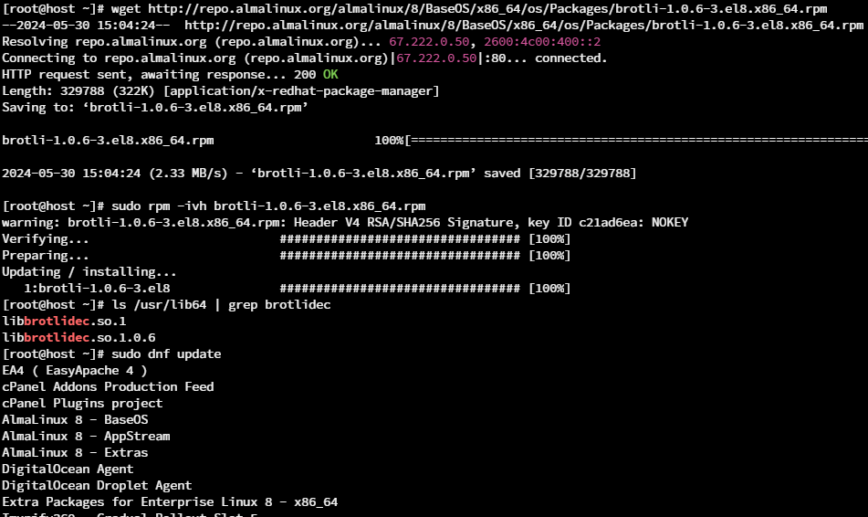
Step 1: Manually Install the Missing Library
If you have network access, you can manually download and install the brotli package, which provides the libbrotlidec.so.1 library. Use the following command to download the package from the AlmaLinux repository:
wget http://repo.almalinux.org/almalinux/8/BaseOS/x86_64/os/Packages/brotli-1.0.6-3.el8.x86_64.rpm
Note: If network access is unavailable, you may need to boot into rescue mode or use a live CD/USB to access the filesystem.
Step 2: Install the Downloaded Package
Once downloaded, install the package using rpm:
sudo rpm -ivh brotli-1.0.6-3.el8.x86_64.rpm
Step 3: Verify the Installation
Ensure the libbrotlidec.so.1 library is now present:
ls /usr/lib64 | grep brotlidec
Step 4: Retry dnf Update
After installing the brotli package, try running the dnf update command again:
sudo dnf update
Conclusion
By following these steps, you should be able to resolve the libbrotlidec.so.1 missing library error and successfully complete the upgrade from CentOS 7 to AlmaLinux 8.
Ensuring that all necessary repositories are correctly set up and that all dependencies are met is crucial for a smooth transition. If you encounter further issues, consider reaching out to the AlmaLinux community for additional support.


This is one of the issues referenced here What's everyone working on?, June 2024 edition