2100 HDD0 initialization error 1

I’ve noticed an issue on a few IBM/Lenovo Thinkpads. When you install an SSD drive, a reboot or restart from the OS does not work. When you reboot, instead opening the boot partition, it throws this error:
2100 HDD0 initialization error 1


2100 HDD0 initialization error 1

Other than avoiding reboot and using shutdown instead, the only solution I’ve found is this:

  1. Shutdown the laptop then power on to boot.
  2. During the “Thinkpad” splash screen, Press F1 on your keyboard to enter the BIOS.
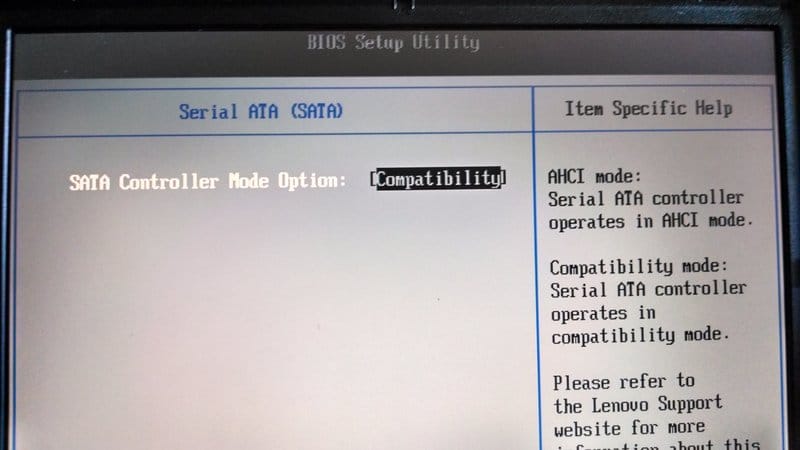
  3. Select Config > Serial ATA (SATA)
  4. Change the SATA Controller Mode Option from AHCI to Compatibility mode.
  5. reboot

Reboot from OS should now work.

Tags:

Stop losing users to slow load times.

Blazing-fast, custom-configured NVMe Linux hosting.

Don't guess if your server is fast enough. Know it. Get a free performance audit of your current setup.

This blog is hosted by StackLinux, our parent company. 99.99% uptime.

Start Your Free Server Audit

You write the code. We'll manage the server.

Fully managed Linux hosting built for absolute speed.

Ditch the server maintenance headaches. Our experts custom-configure high-performance NVMe Linux servers specifically for your needs. Try us out. Your first month is entirely on us.

This blog is hosted by StackLinux, our parent company. 99.99% uptime.

Claim Your 30 Free Days

30 days of NVMe Linux hosting. $0 down.

Risk-free migration and a money-back guarantee.

We are so confident in our high-performance NVMe infrastructure that we'll audit your current server for free, migrate you without downtime, and give you 30 days to see the speed difference yourself.

This blog is hosted by StackLinux, our parent company. 99.99% uptime.

Deploy Free for 30 Days
Top ↑