Why Small VPSs Feel Slower Than They Used To
Servers aren’t what they used to be. If you’ve spun up a small VPS (Virtual Private Server) recently and felt underwhelmed by its snappiness, you’re not alone. A basic 1-core CPU with 1 GB RAM VPS was reasonably responsive a decade ago, yet today’s entry-level instances sometimes struggle under similar workloads.
This article digs into why a “small VPS” can feel slower now, than in years past despite the advances in hardware. We’ll define what “small VPS” means and explore the key factors (from hardware changes to software bloat and industry practices) that contribute to this puzzling slowdown.

Recent shifts have encouraged VPS providers to pack more tenants per host.
What Do We Mean By a “Small VPS”?
When we say small VPS, we’re talking about entry-level virtual private servers. Typically a single virtual CPU and only 1–2 GB of RAM. These are the bargain-tier plans (often around $5–$10 per month) that many projects and new deployments start with. Note: We’ll use this general definition of a “1 vCPU, ~1 GB RAM, SSD-backed” server when comparing 2015 vs. 2020 vs. 2025 scenarios.
Not long ago, small VPS plans typically ran on older hardware with either spinning HDDs or early SATA SSDs for storage; by 2020 most had moved to SSD storage, and by 2025 even budget plans tend to use fast NVMe SSDs.
The economics of low-cost VPS hosting encourage oversubscription.
In short, the baseline hardware for small VPS instances has improved but why hasn’t the performance improved?
Key characteristics of a “small VPS”:
- 1 vCPU thread: Your VPS is allotted one virtual CPU (often a thread of a shared physical core, not an entire core to itself).
- 1–2 GB RAM: Minimal memory – earlier plans in 2015 might have had 512 MB to 1 GB, whereas 1–2 GB is standard now.
- Entry-level pricing: Usually the cheapest tier (around $5–$10 per month).
- Standard storage of its time: In 2015, that often meant HDD or basic SATA SSD; by 2025, it’s typically NVMe SSD (much faster).
We’ll compare how such small VPS plans performed then vs. now and why users might perceive a modern one as “slower.”
Assumptions and Scope
To focus our discussion, let’s clarify the scope and context.
Firstly, we’re talking about typical cloud/VPS providers (DigitalOcean, Linode, Vultr, etc.), not private on-prem servers or specialized setups. These are multi-tenant environments where resources are shared among customers.
Secondly, providers don’t usually disclose exact details like hardware models, hypervisor configurations, or how much oversubscription they do on a host node. We often have to infer performance characteristics from experience and benchmarks, since the provider might be squeezing many virtual servers onto one machine to save costs. In other words, your small VPS is one of many “noisy neighbors” on the same physical host, but you rarely know how many.
Thirdly, we’ll assume you’re trying similar tasks on the VPS now vs. years ago (for example, hosting a website or running a small app). Of course, if your use case changed dramatically, that could affect the perceived performance. Here, we isolate the infrastructure differences as much as possible.
Why Do Today’s Small VPSs Feel Slower?
Several compounding factors contribute to the perceived slowdown of entry-level VPS plans. Ironically, hardware has gotten better each year – but the context in which that hardware operates has also changed. Here are the main reasons:
Heavier Oversubscription and Shared Resources

One big culprit is how shared your “slice” of the server really is. A VPS doesn’t give you a dedicated physical CPU core; it gives you a vCPU – essentially a time-shared thread on a host CPU that’s running many VPS instances at once.
In the mid-2010s, oversubscription (selling more virtual CPU cores than physical cores available) was already common, but the ratios have climbed as the industry pushed prices down. For budget VPS providers, it’s not unusual to pack 8 to 16 vCPUs on each physical core.
In practical terms, your “1 vCPU” small VPS might be contending with a dozen others for the same actual core. If your neighbors happen to be busy, your share of the CPU time shrinks (manifesting as slower response and higher steal time in Linux stats).
Overselling in the industry: The economics of low-cost VPS hosting encourage oversubscription which is essentially a “race to the bottom” where hosts bet that not all customers will use their max resources at once. When that bet goes wrong (many tenants busy simultaneously), everyone experiences lag. A key indicator is high %st (steal) or %wa (I/O wait) time on your VPS. Which means the hypervisor is busy elsewhere or the disk is saturated by others.
In 2015, small VPS plans certainly faced this too, but relatively speaking there were often fewer VMs per host and less aggressive oversell on reputable providers. By 2025, thanks to powerful multi-core servers, a host machine might run far more VMs, and some providers oversell more aggressively to maximize profit. The result can be more frequent noisy-neighbor slowdowns today.
The reality is that in 2026, your small VPS is more “crowded” now. Even though modern CPUs are faster, that advantage can be eaten up if 10+ other VMs are contending for the same core at peak times. This can make performance feel inconsistent. Snappy at off-peak, but sluggish under moderate load simply due to contention.
Oversubscription amplifies the other factors below, and it’s a major reason a new small VPS might feel less responsive than an old one on a quieter host.
CPU Changes: Faster Chips, But New Overheads
Microprocessor performance has improved in the last decade, but not always in ways that benefit a small VPS’s single core speed. Modern server CPUs (2020–2025) tend to have many cores and emphasize efficiency.
For example, a current-generation AMD EPYC might run at a lower base clock per core than a 2015-era Intel Xeon, especially under full load. Single-thread turbo speeds have improved, but whether your vCPU sees that turbo is not guaranteed. It depends on the host’s scheduling and load.
Moreover, around 2018 the industry was hit with the Spectre and Meltdown security vulnerabilities, which led to patches that introduced CPU overhead. Certain operations (especially involving system calls or virtualization context switches) became slower due to these mitigations.
For instance, some database workloads saw a 20% drop in throughput after Spectre/Meltdown patches on older Linux kernels. In a virtualized environment, the impact can vary, but many saw general-purpose performance dip a bit after these security fixes were deployed. A small VPS in 2015 without these mitigations might have actually run some tasks slightly faster (albeit insecurely) than an equivalently specced VPS in 2019 with patches, all else being equal.
The good news is that newer CPU architectures have started to integrate fixes or optimizations to claw back some performance. Modern CPUs (e.g. Intel Ice Lake or AMD Zen 3/4) boast higher IPC (instructions per cycle) and better branch prediction, so they do more work per GHz than old ones. They also have hardware or firmware improvements to lessen the Spectre/Meltdown hit (so the “penalties” are lower than on a 2013-era CPU running patched kernels).
On paper, a single 2025-vintage core is much faster than a 2015 core. So why don’t we feel that boost on our tiny VPS? Two reasons: first, as mentioned, that core’s power is split among more VMs; second, latency matters as much as raw speed. If the host CPU is juggling many threads, your vCPU might experience scheduler latency (brief waits) that add up.
Today’s small VPS runs on faster silicon, but that advantage can be offset by increased context-switching and sharing. Furthermore, modern CPUs prioritize throughput over per-thread performance in many cases. So the single-threaded performance that a tiny VM relies on might not be dramatically higher than it was years ago, or it’s hampered by new overhead. That said, it’s certainly more power-efficient.
Memory Pressure and Software Bloat
Another factor: software (including the OS itself) has gotten hungrier. Back in 2015, a minimal Linux install was pretty lean. You could boot an Ubuntu 14.04 server in under 100 MB of RAM usage. Now, a default Ubuntu 22.04 might easily use a few hundred MB at idle.
Official requirements have shot up: Ubuntu 16.04 server (2016) ran smoothly with 1 GB RAM, whereas Ubuntu 24.04 suggests 2 to 3 GB, or more. That’s more than double the memory footprint for the base system. Even if you strip it down, newer kernels and services do tend to consume more resources.
Modern software has followed suit. The kind of applications people run on small VPSs today (for example, containerized microservices, Node.js apps, Python/Ruby frameworks, etc.) often demand more RAM and CPU than the LAMP stack of a decade ago.
In 2015, you might have hosted a simple WordPress or a PHP app on 1 GB RAM and been fine. Today, that same use-case might struggle because the database wants more memory, PHP and caches are larger, and perhaps you’re also running additional services (Redis, Docker, etc.) that each add overhead.
It’s not that WordPress 2025 is so much heavier than WordPress 2015, but the whole ecosystem around web apps has grown: encryption, background jobs, monitoring agents, container runtimes… they all add up. A small VPS can quickly end up memory-starved, and once you exhaust RAM, performance plunges. The system will start swapping to disk (even with fast NVMe, swap is magnitudes slower than RAM). High swap activity or OOM killing processes will definitely make the server feel slow or unstable.
In essence, that 1 GB of RAM that felt “okay” in 2015 is pretty tight by 2025 standards. You have less headroom now. The OS alone might eat a larger chunk, leaving fewer megabytes for your application. Caches fill up sooner, and any memory leak or spike hurts faster.
If you haven’t adjusted your stack (for example, tuning databases to use less memory), a modern small VPS might constantly live on the edge of memory pressure, whereas earlier it had some breathing room. This contributes to sluggishness; the CPU might be idle, but the system is busy shuffling memory pages around. (This is a classic “looks idle but feels slow” scenario: low CPU usage but high I/O or swap activity.)
Tip: On small VPS instances today, adding a bit of swap (if not already enabled) or choosing a lightweight distro can help mitigate this. Many seasoned admins also opt for slimmer OS choices (Alpine Linux, minimal Debian, etc.) for tiny VMs to avoid the bloat of a full Ubuntu. The goal is to claw back some memory for your apps.
The reality, though, is that the baseline requirements for software have increased. So the same hardware spec gets you proportionally less performance than it once did, unless you strip things down.
Better Storage (But Higher Expectations)
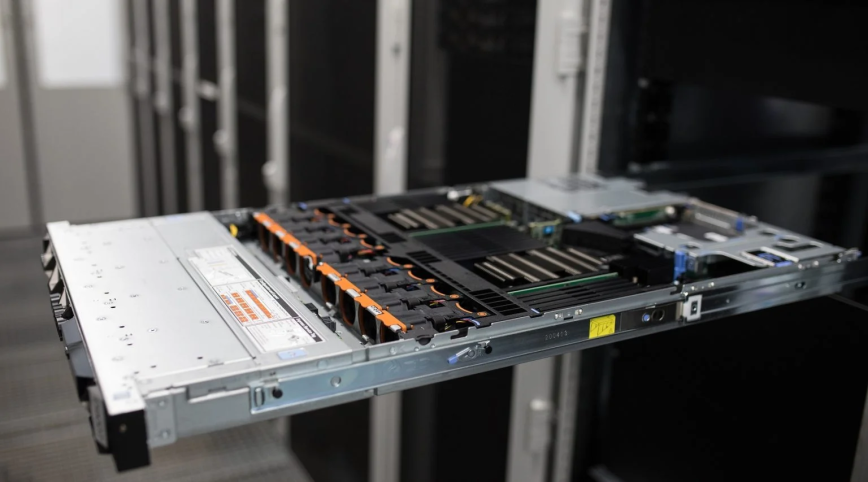
Not everything has gotten worse. Disk I/O is now a lot faster! In 2015, if your cheap VPS had an HDD (or a congested shared SAN), disk throughput and latency were a major bottleneck. By 2020, SSDs became standard, and now in 2026 NVMe SSDs are common even in low-tier plans, offering very high read/write speeds.
So, shouldn’t everything feel faster? It’s true that certain operations (file accesses, database writes, package installs) are quicker now thanks to storage improvements. The problem is that our expectations and workloads have grown in parallel. Faster disk doesn’t help if your server is CPU-bound or memory-bound. And as explained, those became the limiting factors instead. It’s a bit like improving one leg of a table: the table can still wobble if the other legs (CPU, memory) are uneven.
That said, modern small VPSs usually don’t feel slower due to disk, on the contrary, disk-intensive tasks are often much zippier than before. The issue is that you might not notice, because you’re waiting on a slow PHP script or a saturated CPU, not the disk. One could argue that storage is the one area that clearly improved: for example, writing a log or performing a backup on a 2025 VPS is typically much faster than on a 2015 VPS.
But if your overall app still responds slowly (due to CPU scheduling or memory thrash), the end-user won’t be thrilled. The faster storage mainly ensures that disk is no longer the primary bottleneck; the bottleneck has moved elsewhere (CPU, RAM, or even network). In fact, the shift to SSD and NVMe has instead encouraged providers to pack more tenants per host.
Once disk performance stopped being the main bottleneck, they could keep adding VMs until CPU or RAM became the limiting factor instead. So indirectly, better storage could contribute to the oversubscription effect mentioned earlier (hosts balancing one resource against another).
Quick side note: Network speeds have also generally improved (e.g. a lot of providers offer gigabit or better bandwidth now). Like storage, network is seldom the reason a small VPS “feels” slow internally. Rather, it tends to be server-side processing that lags. So we won’t blame the network here; it’s usually fine or at least no worse than before.
Usage Patterns and Background Load
Lastly, there’s also the fact that providers are increasingly and more sophisticatedly impose CPU fair-share policies. If you consistently use a lot of CPU on a cheap plan, you will get throttled.
In the past, some hosts were a bit more permissive about bursting. Today, to prevent abuse which has also increased massively, providers, for instance, use credit systems: your small instance can only burst CPU for short periods before it’s capped. So if you try to max out that 1 vCPU for a long time, you may actually see it step down in performance (to protect the host and hosted neighbors).
These policies cause your VPS to “get slower” under sustained load, often regardless of whether the parent node has plenty of idle resources or not. The result is that a workload that might have been borderline acceptable on an older VPS, could now trigger throttling on a modern equivalent, again making it slower when you need it most.
My Advice: Getting More Performance from a Small VPS
Is all hope lost for the humble “small VPS”? Not necessarily. But to get a snappy experience, you might need to be proactive: choose providers known for not overselling heavily (or consider “dedicated” single-core plans if available), use lean software stacks, and tune your services for low memory usage.
Small VPSs are more powerful than before. But, our expectations and software have grown even faster.
In some cases, spending a bit more for the next tier up is warranted. For example, a $20 VPS with 2 vCPUs and 4 GB RAM in 2025 will often exponentially outperform a $10 1 vCPU/1 GB in real-world use. In 2015, the gap wasn’t as large in perceived performance. The definition of “small but sufficient” has shifted upward.
How StackLinux.com Does Things Differently
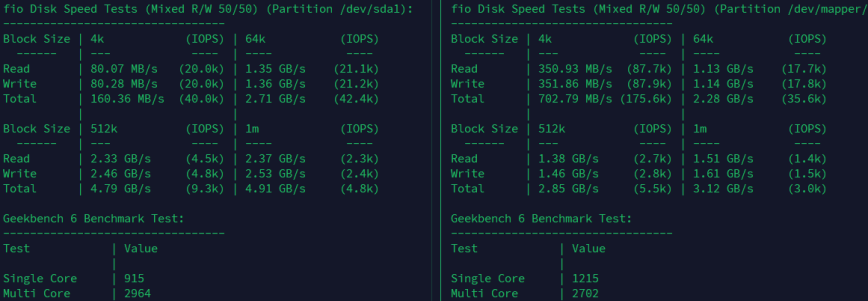
(Left) favors bulk throughput, (right) StackLinux prioritizes responsiveness and latency.
For web hosting, small app servers, database reads, etc.: StackLinux (right side of the screenshot) is more responsive thanks to higher single-core CPU performance and better small-block disk IOPS.
At StackLinux, we’ve made it a priority to avoid the typical VPS pitfalls outlined above. We don’t oversell CPU resources—period. Our vCPU allocations are mapped to realistic usage patterns based on actual hardware behavior, especially in light of the post-2018 performance hits from CPU vulnerability mitigations. In fact, as part of a no-cost upgrade cycle, we replaced older CPUs that were disproportionately impacted by those patches with newer ones that strike a better balance of performance and security.
We also don’t lock ourselves into one chipmaker. Some years, Intel makes more sense for our workloads and thermals; other years, AMD clearly wins. We’ve changed CPU vendors three times in the past six years, driven entirely by measurable improvements, not marketing. Since we upgrade our infrastructure every two to three years, we’re not stuck squeezing life out of aging hardware long past its prime.
Another key difference: we enable turbo boost on all CPUs 24/7, overclock RAM, and use more aggressive I/O settings. There’s no governor pulling clock speeds down to base clocks. Everything always runs at peak frequency, always. That decision means more heat, more wear and that’s precisely why we upgrade hardware aggressively. You’re getting full-throttle performance, not a shared-core plan pretending to be “dedicated.”
On the management side, we don’t throttle customer workloads arbitrarily. If a node has plenty of headroom, your VPS runs uninhibited. If usage climbs and contention becomes possible, we proactively rebalance or split off nodes before performance dips. And when limits are applied, they’re based on real, current resource strain, not preset ceilings baked into a template.
It’s not the cheapest way to run infrastructure. But StackLinux isn’t trying to win the unmanaged low-end race; it’s a fully managed boutique hosting service. If your project, business, or site demands high uptime, tuned performance, and honest capacity, we’re here to handle it. You get predictable performance, rapid upgrades, and real support from myself and others who actually manage your specific servers, not just provision them.
Conclusion
In summary, small VPSs in 2025 are in numerous instances slower than those from 2015, even though the raw hardware is more capable. The reasons are a convergence of technology and practice changes over the years:
- Providers pack more guests onto each machine, so your share of CPU (and to a lesser extent I/O) is less predictable.
- CPU advances were partly negated by security fixes and by focus on many-core throughput over single-core speed, plus any throttling mechanisms in place.
- Software now expects more memory and CPU, putting a greater strain on minimal specs (e.g. a modern OS might need 2–4 GB RAM to breathe easy, whereas 1 GB was fine before).
- We tend to run more on our servers (containers, additional services), and hosts impose limits to prevent any one VPS from hogging resources.
At the end of the day, Moore’s Law hasn’t really failed us. Small VPS instances are more powerful than before. But, our expectations and software have grown even faster. Understanding these factors can help you make better decisions (or at least feel less mystified) when that brand new VPS isn’t as speedy as you expected. Small VPSs are still extremely useful and cost-effective, but now we know why they might feel slower than they used to, and we can adjust accordingly.
Remember, an idle-looking VPS isn’t necessarily an efficient one. Pay attention to those less obvious metrics (CPU steal, I/O wait, swap usage) – they often tell the story behind the slowness. And when in doubt, consider scaling up just a notch; you might be pleasantly surprised how much difference a slightly larger plan can make in the post-2020 landscape of web hosting.


Interesting read, but my thoughts evolved as I read, and I wound up confused. Given the software problems (like OS requirements), the article suggests stripping things down helps, but near the end, the article pretty much says “StackLinux has your back” by mentioning policies that seem to make smart software choices irrelevant. Where’s the sweet spot for StackLinux customers with respect to installing does-more-and-uses-more software?
@Mat That’s a fair question, and I can see why it reads that way.
The intent isn’t that StackLinux makes software choices irrelevant. It’s that it removes a lot of the structural penalties that small VPSs suffer from today, so sensible software decisions actually pay off again.
A lean stack still matters. What StackLinux changes is the baseline: less contention, fewer throttles, more consistent CPU scheduling, and disk behavior that favors responsiveness instead of burst-heavy throughput. That’s the part users usually can’t control.
The “sweet spot” is still lean-by-design workloads: small web apps, databases, APIs, and services that care about latency and consistency. If someone installs increasingly heavy, memory-hungry software on a small instance, they’ll still hit limits. The difference is that those limits arrive because of the workload itself, not because the platform was already stacked against it.
In short, StackLinux doesn’t replace good judgment. It makes good judgment worth it again.
I dunno, YMMV, but my VPS are still pretty snappy. I’ve got a couple of them for $3.99 each a month, running Debian 12, with 1 CPU and 1 GB RAM. They’re running as MX hosts and openarena servers.
Thanks @hydn , makes sense.
@J_J_Sloan
Nice! Curious… do you mind sharing a screenshot of the output of:
*The
ddtest is CPU bound, not disk bound. As you can see just generating zeroes in memory and hashing them. (when CPU is near idle)Via: Your Web Host Doesn’t Want You To Read This: Benchmark Your VPS