PHP performance: oPcache Control Panels
OPcache is a PHP extension that improves PHP performance by storing precompiled script bytecode in shared memory, thereby removing the need for PHP to load and parse scripts on each request. The extension is built-in for PHP 5.5+. If you want to improve PHP performance, the first step should be to use PHP 8+, which is faster than PHP 7. In any case, using OPcache will speed up scripts ~ two times faster!
PHP oPcache Control Panels
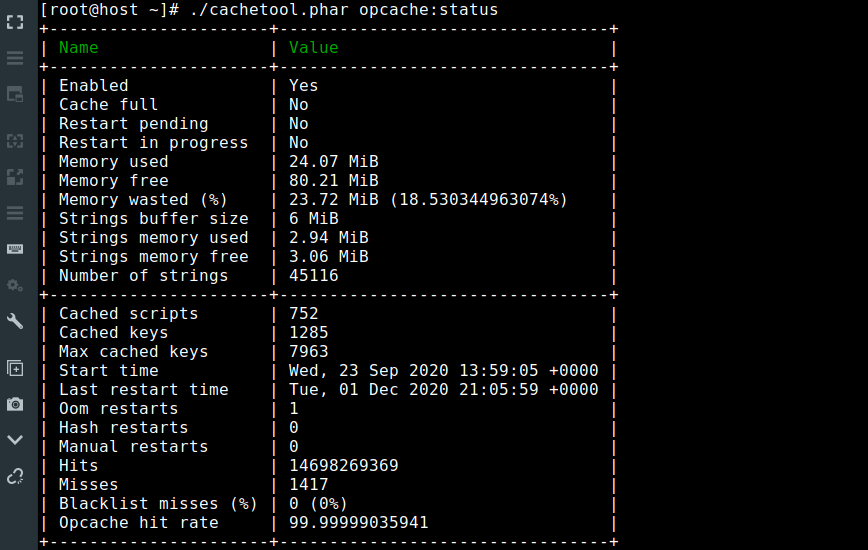
- CacheTool (Recommended) – Manage cache in the CLI. (Supports PHP 8. See the above screenshot)
- OPcache GUI by amnuts – OPcache statistics, settings and cached files. Provides real-time stats. (Supports PHP 8 + JIT)
PeeHaa’s OpCacheGUI – A nice alternative GUI for PHP’s OpCache.(May still work, but not maintained)OPcache Dashboard by Carlos Buenosvinos – monitor OPcache with this dashboard.(May still work, but not maintained)- OCP by _CK_ – One of if not THE first OPcache control panels available. (old but simple and still works!)
Improve PHP performance with OPcache config tweaks
If you’d like to improve PHP performance even more with OPcache, try applying some of all of the below changes to your php.ini or opcache.ini config file. Or hire me. (Performance gains are most noticeable on higher throughput servers):
opcache.revalidate_freq = 10
	(default "2") How often (in seconds) to check file timestamps for changes to the shared
	memory storage allocation. ("1" means validate once per second, but only
	once per request. "0" means always validate)
opcache.fast_shutdown = 1
	(default "0") If enabled, a fast shutdown sequence is used for the accelerated code
	The fast shutdown sequence doesn't free each allocated block, but lets
	the Zend Engine Memory Manager do the work.
opcache.file_update_protection = 0
	(default "2") Prevents caching files that are less than this number of seconds old.
	It protects from caching of incompletely updated files. In case all file
	updates on your site are atomic, you may increase performance setting it
	to "0".
Reference:
— PHP OPcache page: http://php.net/manual/en/book.opcache.php
— List of PHP accelerators: https://en.wikipedia.org/wiki/List_of_PHP_accelerators
Published: August 13th, 2017 | Last updated: April 15th, 2024


Thanks for link to CacheTool, that looks fantastic.
I’ve only ever used a GUI tool for Opcache with limited functionality so this will be super nice to have. Invalidating scripts via cron seems like it will be especially useful.
CacheTools looks great, but I’m a bit stuck on how to get it working. I’m a noob, please bare with me.
I don’t use fastcgi, I’m using lsphp. What should replace --fcgi in the command?
Once I (hopefully) get this working, should I password protect it? Not sure if it contains sensitive info or not.