Cloudflare with Discourse: Setup Guide (WAF & Security Rules)
I run a Discourse forum behind Cloudflare, and getting the WAF rules right took more trial and error than I expected. Discourse is a Ruby on Rails application that most people self-host in a Docker container. It handles traffic differently from a typical CMS, and generic Cloudflare WAF rules will either break your forum or leave it exposed.
The official Discourse + Cloudflare guide covers DNS, SSL/TLS, and basic WAF exceptions, but it doesn’t get into the custom Cloudflare WAF rules for Discourse that actually protect your forum from scanners, scrapers, and abuse. This guide fills that gap. Every rule here has been tested on a live forum, linuxcommunity.io, and tuned against real firewall event logs over months of production traffic.
If you haven’t already, read my Recommended Cloudflare Performance & Security Settings Guide first. It covers the general Cloudflare configuration that applies to any site. This article focuses specifically on the Cloudflare security rules that are relevant to Discourse.
Prerequisites
Before setting up WAF rules, make sure your Discourse + Cloudflare basics are in place:
- DNS records proxied (orange cloud on)
- SSL/TLS set to Full (strict)
- Cloudflare template added to your
containers/app.yml(- "templates/cloudflare.template.yml") so Discourse sees real client IPs instead of Cloudflare’s - Rocket Loader disabled. This breaks Discourse’s Ember.js frontend and is the single most common cause of “my forum is broken after enabling Cloudflare”
- Caching level set to Standard
Bot Traffic Settings
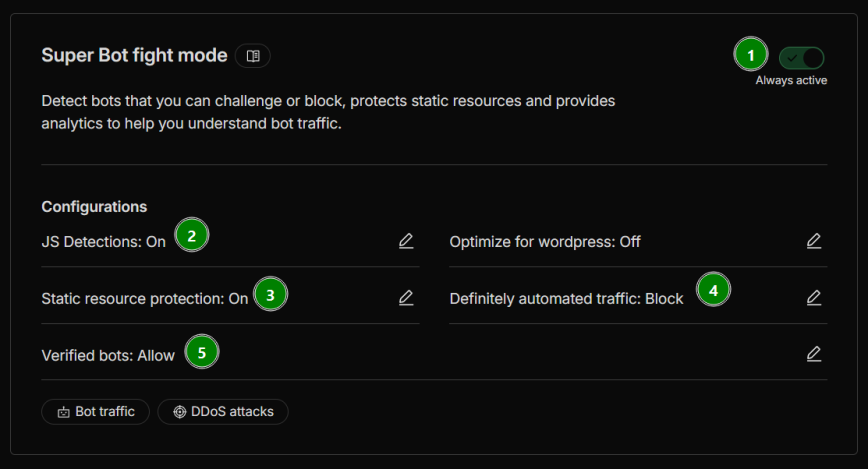
With the basics configured, the next step before building custom rules is to set up your bot traffic settings at Security > Settings > Bot Traffic. These settings reduce the volume of low-effort automated traffic before it even reaches your custom rules, making them complementary rather than redundant.
Free plan users get Bot Fight Mode (not Super Bot Fight Mode). The only configurable option is JS Detections. Enable it.
Pro plan and above get Super Bot Fight Mode with additional controls. Here are my recommended settings for Discourse:
- Super Bot Fight Mode: On (always active). This is the master toggle. It needs to be enabled for the settings below to take effect.
- JS Detections: On. Injects a lightweight, invisible JavaScript snippet to detect automated browsers. This helps Cloudflare distinguish real browsers from headless scrapers without affecting page load.
- Static resource protection: On. Extends bot detection to static assets like images, stylesheets, and scripts. Without this, bots can scrape your static content without triggering any detection.
- Optimize for WordPress: Off. This is a Discourse forum, not WordPress. Enabling this can interfere with Discourse’s Ember.js frontend in the same way Rocket Loader does.
- Definitely automated traffic: Block. Traffic that Cloudflare identifies with high confidence as automated gets blocked outright. This catches low-effort bots but also breaks oneBox (see note just below this list).
- Likely automated traffic: Allow. This setting is only available on Business plans and above. If you have access to it, start with Allow and only change it to Managed Challenge after monitoring your Security Events for false positives. Setting it to Block or Challenge on a technical forum risks catching legitimate tools and scripts your members use.
- Verified bots: Allow. This lets Cloudflare-verified bots (Googlebot, Bingbot, etc.) through, which aligns with the
cf.client.botflag used in your custom rules.
A note on OneBox (link previews): When someone posts a link to your site on another Discourse forum, that remote server sends a request to fetch your page’s metadata (title, description, image) to generate a link preview. The request comes from whatever datacenter hosts that remote forum. Also read: Cache onebox images and/or serve them from the main domain—which may not be the solution, but is related to the same issue.
If “Definitely automated traffic” is set to Block (or Managed Challenge), Cloudflare will block these requests because they are, by definition, automated. This breaks OneBox previews of your site on every other Discourse forum.
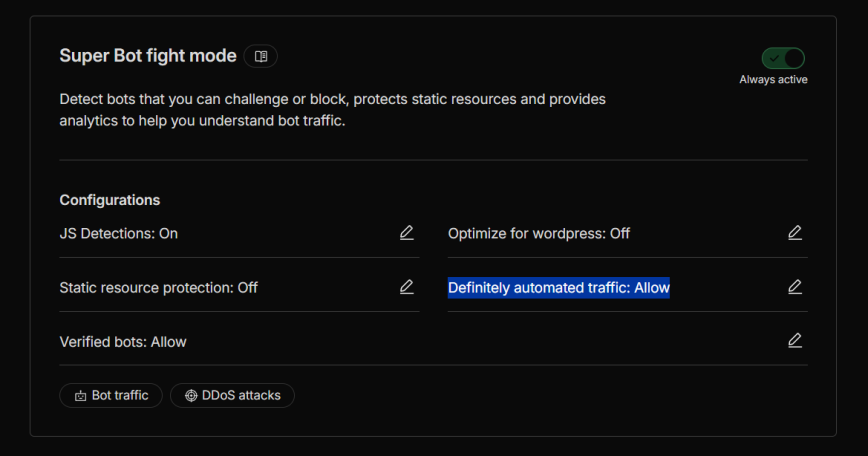
You have two options. The first is to set Definitely automated traffic to Allow instead of Block. This fixes OneBox but also allows other low-effort bots through, which your custom rules will still catch.
The second is to keep Block enabled and add a custom rule above your other rules that skips Super Bot Fight Mode for OneBox requests. I’m still testing and working on this. Because if a UA skip rule is used, then it can be spoofed. If you have a better solution to this, please let me know.
Understanding Rule Order
Cloudflare evaluates custom rules from top to bottom. The first matching rule wins, and some actions (like Block) stop evaluation entirely. This means rule order isn’t just cosmetic. It determines whether your VPN-using members get blocked or your static assets get unnecessarily challenged.
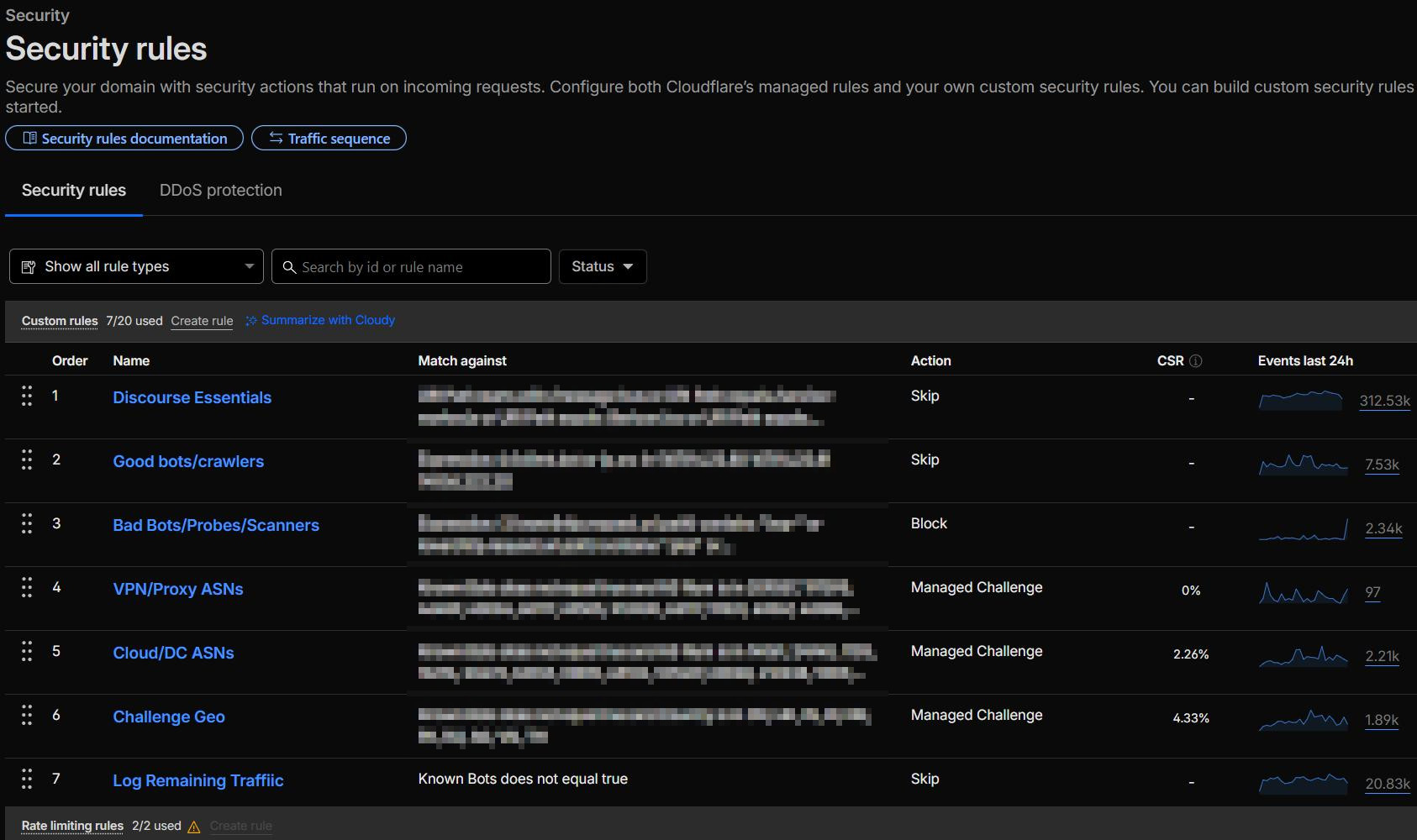
My recommended custom rules order for a Discourse forum is:
- Discourse Essentials — Skip (prevent challenges on CSS/JS/images/message-bus)
- Good bots/crawlers — Skip (optional, for logging insights only). Cloudflare already allows verified bots by default, so this rule just gives you visibility into bot traffic.
- Bad Bots/Probes/Scanners — Block (catch malicious UAs and probing paths)
- VPN/Proxy ASNs — Managed Challenge (challenge traffic from known VPN/proxy providers)
- Cloud/DC ASNs — Managed Challenge (challenge traffic from datacenter/cloud providers)
- Challenge Geo — Managed Challenge (region-based challenges)
- Log Remaining Traffic — Skip with logging (optional, catch-all for traffic visibility)
Plus, as a separate rule type in Cloudflare: Rate limiting.
Navigate to Security > Security rules to start building your custom rules. Cloudflare’s free plan gives you 5 custom rules; Pro gives 20. However, rules 2 (Good bots/crawlers) and 7 (Log Remaining Traffic) are optional and exist purely for logging insights, since Cloudflare already allows verified bots by default. If you need to stay within the free tier’s 5-rule limit, you can also combine VPN/Proxy ASNs and Cloud/DC ASNs into a single rule. A Pro account gives you room to split them for easier management.
Rule 1: Discourse Essentials (Skip)
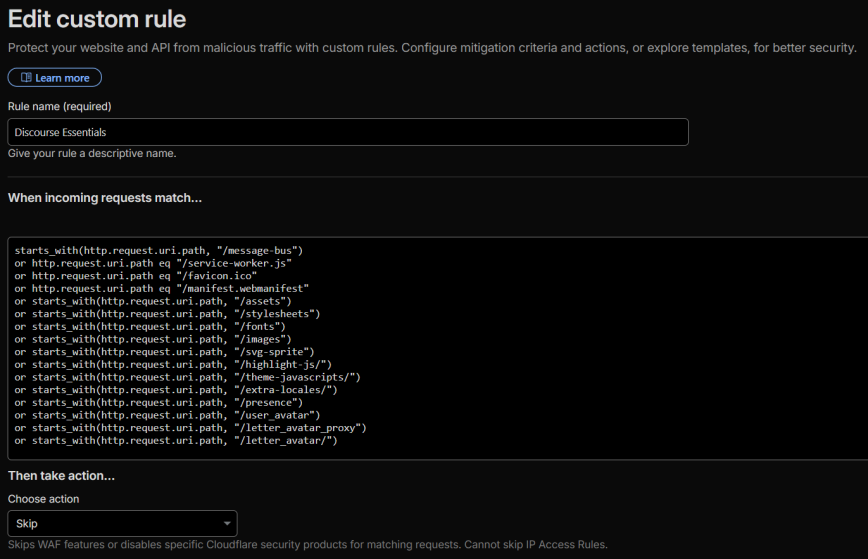
Action: Skip — All remaining custom rules, all rate-limiting rules, all managed rules, all Super Bot Fight Mode rules
Log matching requests: On
starts_with(http.request.uri.path, "/message-bus")
or http.request.uri.path eq "/service-worker.js"
or http.request.uri.path eq "/favicon.ico"
or http.request.uri.path eq "/manifest.webmanifest"
or starts_with(http.request.uri.path, "/assets")
or starts_with(http.request.uri.path, "/stylesheets")
or starts_with(http.request.uri.path, "/fonts")
or starts_with(http.request.uri.path, "/images")
or starts_with(http.request.uri.path, "/svg-sprite")
or starts_with(http.request.uri.path, "/highlight-js/")
or starts_with(http.request.uri.path, "/theme-javascripts/")
or starts_with(http.request.uri.path, "/extra-locales/")
or starts_with(http.request.uri.path, "/user_avatar")
or starts_with(http.request.uri.path, "/letter_avatar_proxy")
or starts_with(http.request.uri.path, "/letter_avatar/")
This rule goes first because it handles the highest volume of traffic on any Discourse forum. It prevents Cloudflare from challenging requests for static resources. Without it, every CSS file, JavaScript bundle, emoji image, and avatar loaded by a user on a flagged ASN or geo-blocked country will trigger a managed challenge, breaking the page load even though the user already passed the challenge on the main page request.
Why these specific paths?
These paths come directly from Discourse’s nginx configuration and routes.rb, which treat them as static asset routes. Discourse’s own internal profiler skips these same paths. They serve CSS, JavaScript, fonts, SVG icons, syntax highlighting bundles, theme assets, localization strings, and user avatars. None of them contain sensitive data or benefit from WAF inspection.
Why include /message-bus?
/message-bus is Discourse’s real-time notification system. It uses HTTP long-polling to keep logged-in users updated with new replies, notifications, and presence indicators. Discourse co-founder Sam Saffron has noted that message-bus is already a somewhat fragile path through Cloudflare due to long-running request termination. Adding WAF challenges on top of it causes additional breakage: users on VPN or challenged ASNs will have their real-time notifications interrupted every time their cf_clearance cookie expires mid-session. Since unauthenticated message-bus requests return empty responses (no sensitive data is exposed), the security tradeoff favors smooth UX.
Why exclude /uploads?
Unlike the paths above, /uploads serves user-generated content (images, attachments). Skipping WAF on uploads would let scrapers bulk-download all user-posted content without any friction. If you find that challenged users are having trouble loading images in posts, you can add /uploads to this skip rule, but monitor for scraping patterns if you do.
Rule 2: Good Bots / Crawlers (Skip) — Optional
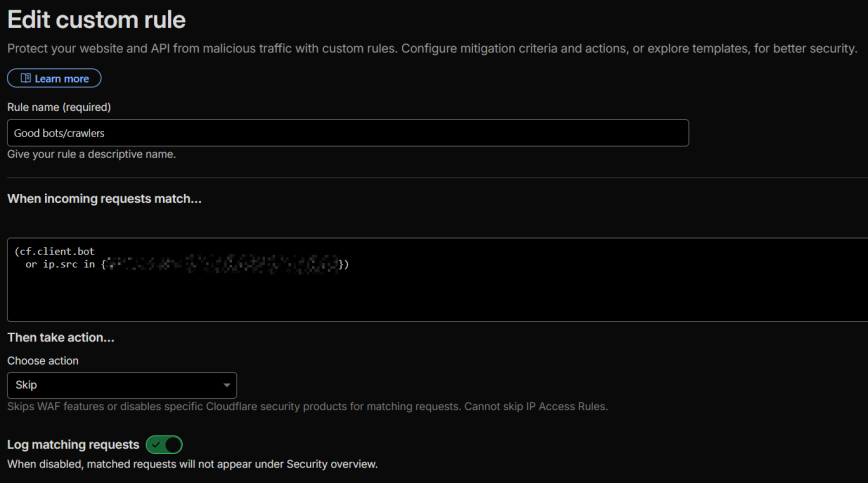
Action: Skip — All remaining custom rules, all rate-limiting rules, all managed rules, all Super Bot Fight Mode rules
Log matching requests: On
(cf.client.bot
or ip.src in {my.server.ip.1 my.server.ip.2})
This rule is optional. Cloudflare already allows verified bots through by default, so you don’t need this rule for bots to reach your forum. The reason I use it is for the logging. With “Log matching requests” enabled, you get visibility into exactly which verified bots are hitting your forum and how often. If you’re on the free plan and need to stay within 5 rules, skip this one.
This single expression handles all verified bots that Cloudflare recognizes: Googlebot, Bingbot, ChatGPT-User, ClaudeBot, GPTBot, Amazonbot, DuckAssistBot, and dozens more. (Note: PerplexityBot is not on Cloudflare’s verified bot list. See the “Managing AI crawlers” section below.) Cloudflare verifies these bots server-side using reverse DNS and IP range checks, so the cf.client.bot flag cannot be spoofed.
Why not match by user agent string?
You’ll see guides that skip bots using http.user_agent contains "Googlebot". Don’t do this. User agent strings are trivially spoofable. Anyone can set their UA to “Googlebot” and bypass all your rules. The cf.client.bot flag is Cloudflare-verified and unspoofable.
Managing AI crawlers
Cloudflare’s AI Crawl Control page (AI Crawl Control > Crawlers) lets you individually Allow or Block each AI crawler. Bots set to “Allow” get the cf.client.bot flag; bots set to “Block” don’t. This means you control which AI bots bypass your WAF entirely from the AI Crawl Control interface, without touching your WAF rules.
If you want search engines and AI retrieval bots (like ChatGPT-User) to access your forum but don’t want AI training crawlers (GPTBot, ClaudeBot) scraping your content, set the training crawlers to “Block” on that page. Bots not on Cloudflare’s verified list (like PerplexityBot) won’t receive the cf.client.bot flag regardless of this setting. You can also manage AI crawler access via robots.txt, but the Cloudflare approach enforces it at the network edge.
Hardcoded IPs (optional)
If you have specific monitoring services or known-good IPs that aren’t covered by cf.client.bot (such as your uptime monitor’s IPs or a connected WordPress instance), add them to this rule:
(cf.client.bot
  or ip.src in {12.345.67.89 12.345.67.89})
Replace the example IPs with your actual trusted IPs.
Rule 3: Bad Bots / Probes / Scanners (Block)
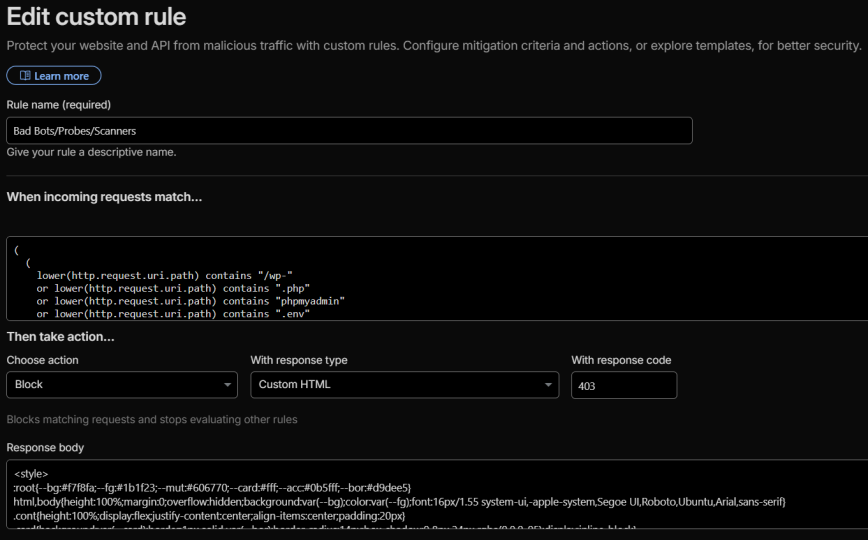
Action: Block
(
  (
    lower(http.request.uri.path) contains "/wp-"
    or lower(http.request.uri.path) contains ".php"
    or lower(http.request.uri.path) contains "phpmyadmin"
    or lower(http.request.uri.path) contains ".env"
    or lower(http.request.uri.path) contains ".git"
    or lower(http.request.uri.path) contains "config.json"
    or lower(http.request.uri.path) contains "/cgi-bin"
    or lower(http.request.uri.path) contains "/.aws"
    or lower(http.request.uri.path) contains "/.docker"
    or lower(http.request.uri.path) contains "/vendor"
  )
  or
  (
    lower(http.user_agent) contains "sqlmap"
    or lower(http.user_agent) contains "nmap"
    or lower(http.user_agent) contains "zgrab"
    or lower(http.user_agent) contains "masscan"
    or lower(http.user_agent) contains "dirbuster"
    or lower(http.user_agent) contains "nikto"
  )
)
and not (
  starts_with(http.request.uri.path, "/message-bus")
  or http.request.uri.path eq "/service-worker.js"
  or http.request.uri.path eq "/favicon.ico"
  or http.request.uri.path eq "/manifest.webmanifest"
  or starts_with(http.request.uri.path, "/assets")
  or starts_with(http.request.uri.path, "/stylesheets")
  or starts_with(http.request.uri.path, "/fonts")
  or starts_with(http.request.uri.path, "/images")
  or starts_with(http.request.uri.path, "/svg-sprite")
  or starts_with(http.request.uri.path, "/highlight-js/")
  or starts_with(http.request.uri.path, "/theme-javascripts/")
  or starts_with(http.request.uri.path, "/extra-locales/")
  or starts_with(http.request.uri.path, "/user_avatar")
  or starts_with(http.request.uri.path, "/letter_avatar_proxy")
  or starts_with(http.request.uri.path, "/letter_avatar/")
)
and not cf.client.bot
Why the exclusion block?!
You’ll notice the and not (...) exclusion block mirrors the Discourse Essentials skip rule (Rule 1). This is intentional redundancy. Under normal rule ordering, these paths never reach the block rule because Rule 1 already skipped them. But if you or a team member ever reorders, modifies, disables, or accidentally deletes Rule 1, this exclusion prevents the block rule from catching legitimate static asset requests. It adds expression length but costs nothing at evaluation time.
The and not cf.client.bot exclusion at the bottom in the same light also ensures verified good bots aren’t accidentally caught.
This rule catches two categories of bad traffic:
Path-based blocking: Discourse is a Ruby on Rails application. It does not serve .php files, WordPress paths, .env files, phpMyAdmin, or any of the other paths listed above. Any request for these is definitionally malicious: a scanner probing for vulnerabilities that don’t exist on your stack. The expanded list covers WordPress vulnerability scanners (which rotate through hundreds of /wp-admin/, /wp-content/, and /wp-includes/ paths), .env file harvesters looking for exposed API keys, .git directory probes attempting to download source code and credentials, /.aws and /.docker config harvesters, legacy /cgi-bin probes, and /vendor directory scanners looking for exposed dependency files.
UA-based blocking: Tools like sqlmap, nmap, zgrab, masscan, dirbuster, and nikto identify themselves in their user agent strings. While sophisticated attackers won’t use these default UAs, a surprising amount of automated scanning traffic does.
Note for WordPress + Discourse integrations
If you use the wp-discourse plugin to connect a WordPress site on a different domain, this rule will not interfere. The plugin communicates with Discourse via its API endpoints (/posts.json, /categories.json, etc.), not through WordPress file paths. No legitimate Discourse traffic hits /wp-* or .php paths.
Rule 4: VPN/Proxy ASNs (Managed Challenge)
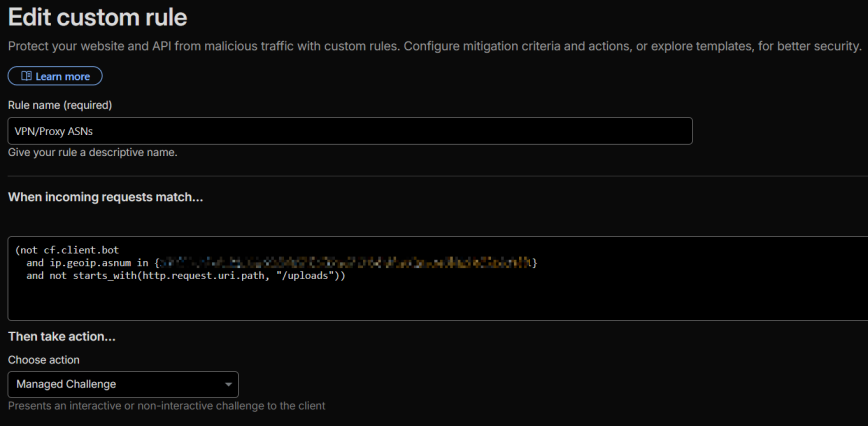
Action: Managed Challenge
(not cf.client.bot
  and ip.geoip.asnum in {ASN1 ANS2 ASN3 ASN4 ASN5 ASN6 ASN7 ASN8})
If your forum caters to a technical or privacy-conscious audience (Linux users, security professionals, developers), a significant portion of your members will browse through commercial VPN services. The most common VPN provider ASNs are M247 (NordVPN, Surfshark), PacketHub (Mullvad), and CDNEXT.
Set these to Managed Challenge, not Block. Real humans will pass the challenge; bots won’t. If you hard-block these ASNs, you’ll silently lose engaged community members who never report the issue because they just leave.
I keep this as a separate rule from Cloud/DC ASNs (Rule 5) because VPN traffic requires different tuning. VPN ASNs have a higher ratio of legitimate users compared to pure datacenter ASNs, and you may want to adjust thresholds independently. If you’re on the free plan and need to conserve rules, combine Rules 4 and 5 into a single Managed Challenge rule with all ASNs in one expression.
Note: If you are using the wp-discourse plugin, especially on a different domain, you’ll want to exclude the /uploads path from this Managed Challenge rule:
(not cf.client.bot
and ip.geoip.asnum in {ASN1 ANS2 ASN3 ASN4 ASN5 ASN6 ASN7 ASN8}
and not starts_with(http.request.uri.path, "/uploads"))
Discourse serves user-posted images and attachments from /uploads, and these are frequently loaded when a WordPress site uses the wp-discourse plugin to display forum comments with embedded images at the end of WordPress blog posts. Cross-domain sub-resource requests can’t render a managed challenge interactively, so the image silently fails to load. Excluding /uploads from the ASN challenge rules prevents this while still challenging all page-level requests (/t/, /u/, /categories, etc.) from datacenter and VPN traffic. Just make sure you also have Static Resource Protection enabled in Super Bot Fight mode. (Pro accounts only)
Rule 5: Cloud/DC ASNs (Managed Challenge)
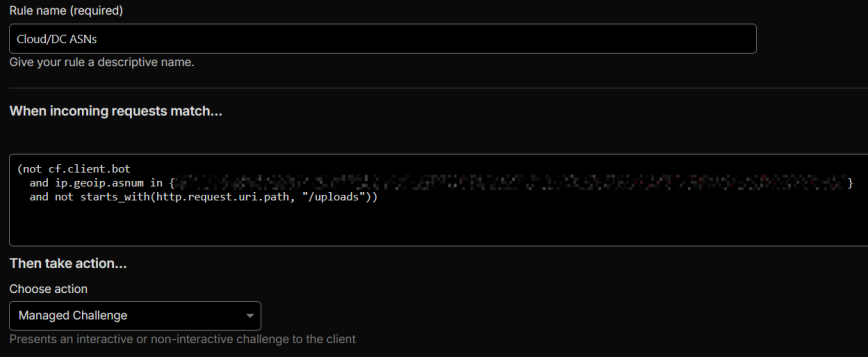
Action: Managed Challenge
(not cf.client.bot
  and ip.geoip.asnum in {ASN9 ANS10 ASN11 ASN12 ASN13 ASN14 ASN15 ASN16})
Challenge traffic from datacenter and cloud provider ASNs (Hetzner, OVH, DigitalOcean, Vultr, Alibaba, Oracle, etc.). Most legitimate forum users browse from residential ISPs, not datacenters. If your Discourse server also runs a local firewall like CSF or iptables, the WAF rules here work as a complementary layer alongside OS-level security controls.
Check the challenge bypass rate (labeled “CSR” in the Cloudflare dashboard) in your Security Events after deploying: a 50-70% bypass rate is healthy, meaning real humans are passing while bots aren’t. If the bypass rate is very low (<20%), you may be blocking a region with few real users. If it’s very high (>90%), the challenge isn’t providing much value.
Note: Again, if you are using the wp-discourse plugin, especially on a different domain, you’ll want to exclude the /uploads path from this Managed Challenge rule:
(not cf.client.bot
and ip.geoip.asnum in {ASN9 ANS10 ASN11 ASN12 ASN13 ASN14 ASN15 ASN16}
and not starts_with(http.request.uri.path, "/uploads"))
Discourse serves user-posted images and attachments from /uploads, and these are frequently loaded when a WordPress site uses the wp-discourse plugin to display forum comments with embedded images. Cross-domain sub-resource requests can’t render a managed challenge interactively, so the image silently fails to load. Excluding /uploads from the ASN challenge rules prevents this while still challenging all page-level requests (/t/, /u/, /categories, etc.) from datacenter and VPN traffic.
Rule 6: Challenge Geo (Managed Challenge)
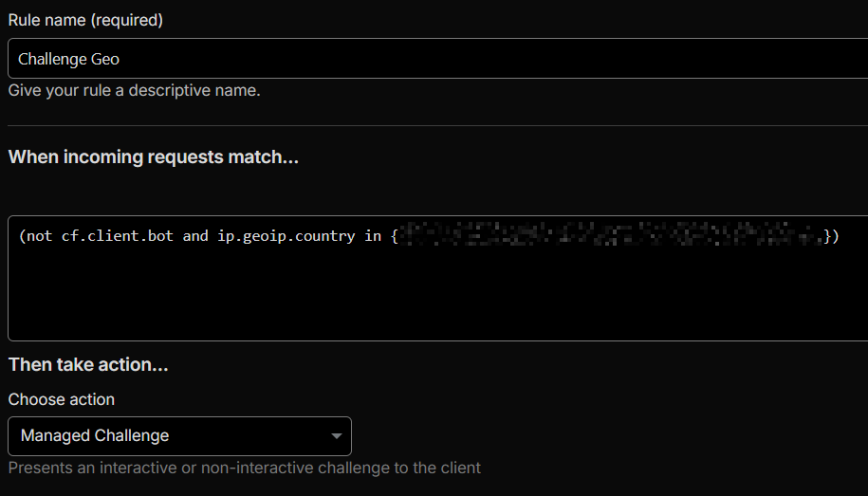
Action: Managed Challenge
(not cf.client.bot
 and ip.geoip.country in {"T1" "CN" "IN" "NG" "PK" "RU" "VN"})
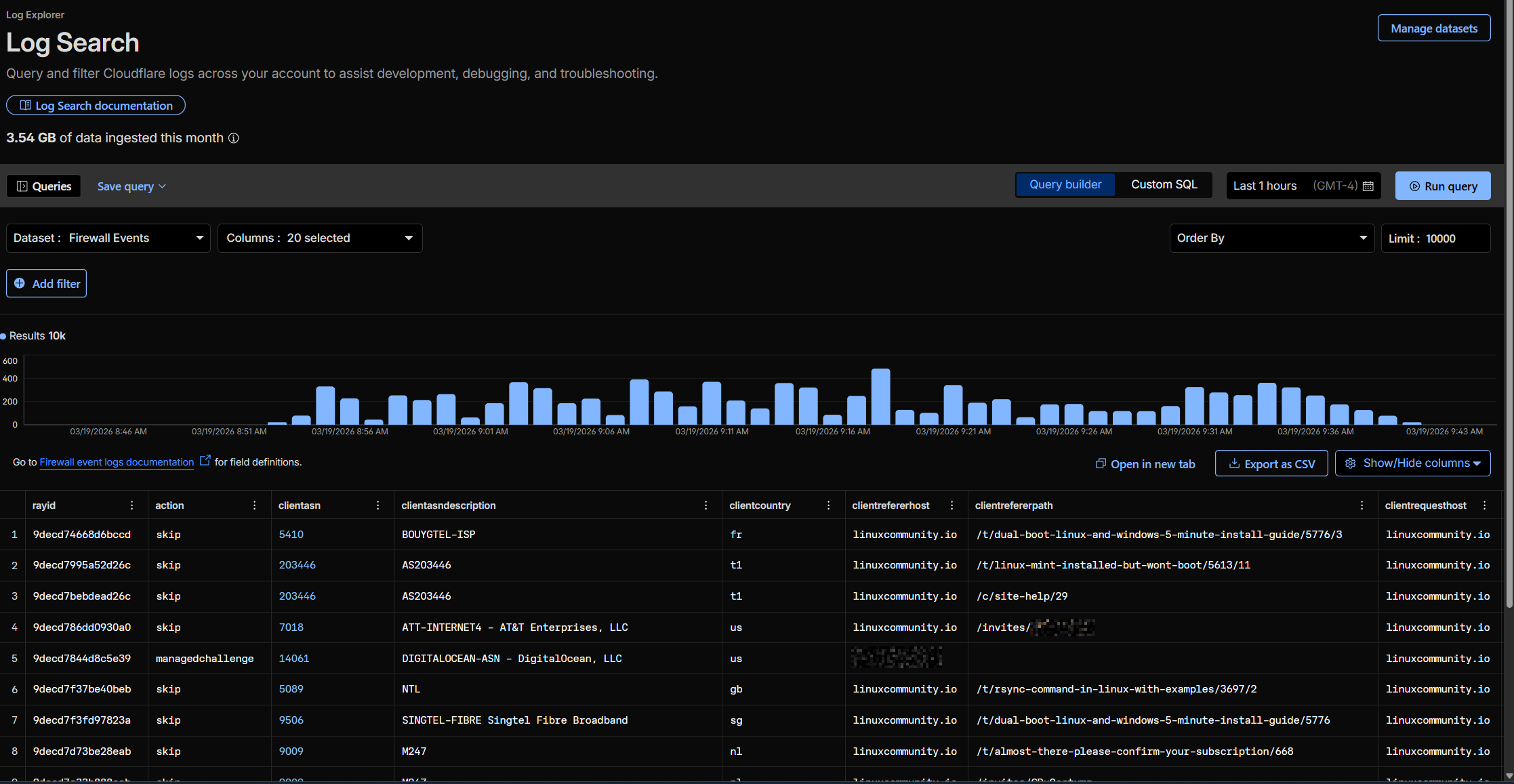
Challenge traffic from countries that generate disproportionate bot traffic relative to your forum’s actual audience. Use your Cloudflare Security Events data to identify which countries are generating the most blocked or challenged requests, cross-reference with your Discourse analytics to see which countries your real users come from, and set the action to Managed Challenge (not Block) so legitimate users from those regions can still access your forum.
The six countries above (+ T1 – Tor) are based on my logs for linuxcommunity.io. Yours will be different!
Rule 7: Log Remaining Traffic (Optional)
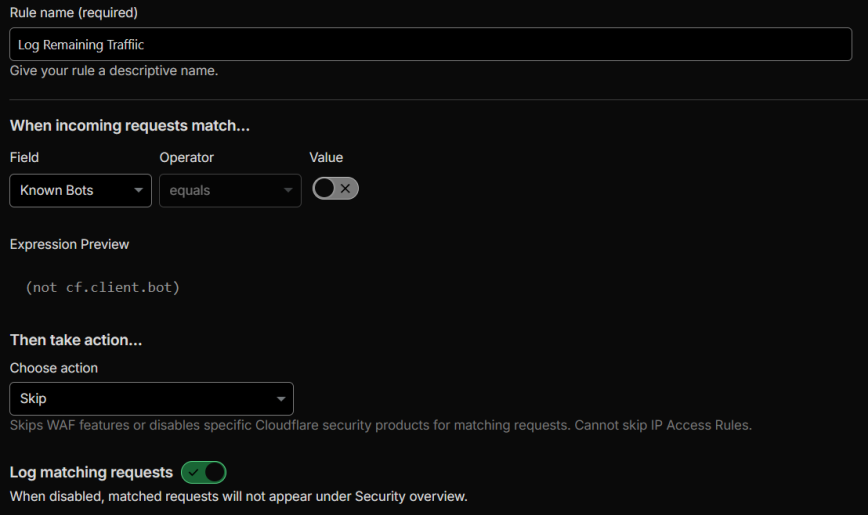
Action: Skip (with logging enabled, no WAF components skipped)
(not cf.client.bot)
Place this as your last rule. It doesn’t skip any WAF components. It exists purely to log all non-bot traffic that wasn’t caught by any previous rule. This gives you visibility into what’s reaching your forum unchallenged, which is invaluable for identifying gaps in your rules and building new ones.
Like Rule 2, this is optional. If you’re on the free plan, you can drop this to stay within your 5-rule limit.
Rate Limiting
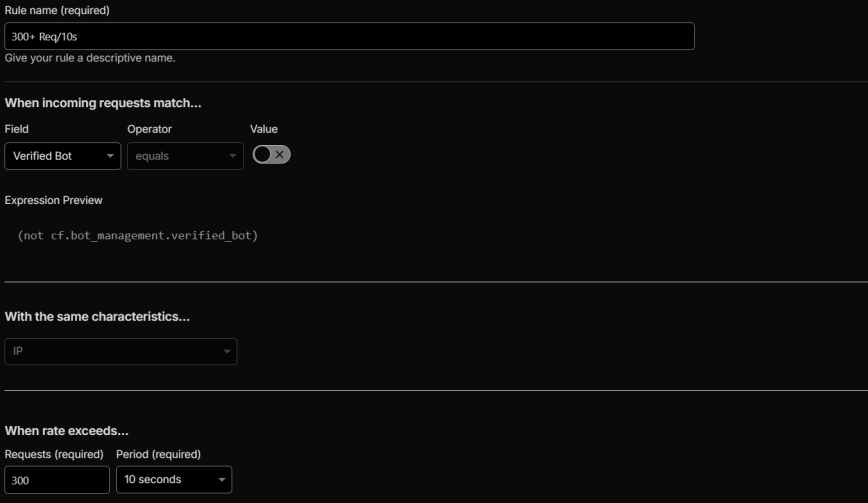
Navigate to Security > Security rules > Rate limiting rules (separate from custom rules).
Rate limiting for Discourse requires careful threshold tuning because Discourse’s architecture generates a high volume of parallel background requests during normal usage. When a logged-in user is actively composing a reply, the browser simultaneously fires:
- Draft auto-save requests (
/drafts.json) every few seconds - Message-bus long-polls (
/message-bus/*/poll) - Presence updates (
/presence/update) for the “user is typing” indicator - Topic timing updates (
/topics/timings) - Emoji search and asset loading
- Post submission (
/posts)
A single active user composing a post can easily generate 200-300+ requests in a 10-second window. If you set your rate limit too low, you’ll block your most engaged users, the ones actively writing posts, while idle lurkers sail through untouched.
Recommended threshold
500 requests per 10 seconds is a safe starting point for Discourse. This is high enough to avoid false positives during active post composition while still catching aggressive scrapers and automated tools. Set the action to Managed Challenge rather than Block during your initial testing period, then switch to Block once you’ve confirmed no legitimate users are being caught. Start at 500 and lower to find the sweet spot.
Monitor the rate-limiting events in Security Events after deployment. If you see residential ISP IPs getting rate-limited (especially users who are actively posting on your forum), raise the threshold.
Managed Rules – WAF Exceptions
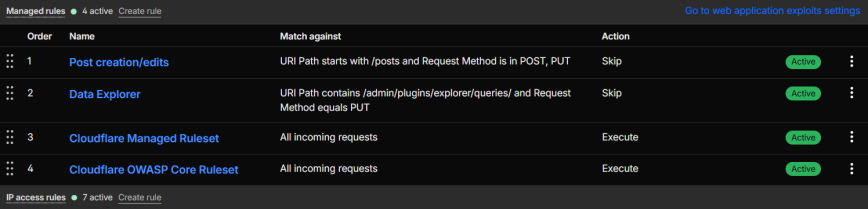
If your Cloudflare plan includes Managed Rules (Pro and above), you need two WAF exceptions to prevent Cloudflare’s managed ruleset from blocking legitimate Discourse operations.
On Pro and above, add these in the Managed Rules section of the dashboard (Security > Security Rules > Managed rules). Free plan users get the Cloudflare Free Managed Ruleset (a smaller subset), which is less likely to trigger false positives on post content. However, if you do hit false positives on code-heavy posts, you can add the same expressions as custom rules (Security > Security rules) with the action set to Skip and “All managed rules” checked under WAF components to skip. This costs you custom rule slots per exception, but only needed on Pro or above plans.
Skip WAF on post creation/edits
(starts_with(http.request.uri.path, "/posts")
  and http.request.method in {"POST" "PUT"})
Action: Skip all remaining managed rules. Log matching requests: On.
Without this exception, Cloudflare’s managed rules may flag legitimate post content as an XSS or SQL injection attempt, especially posts containing code snippets, HTML examples, or SQL queries, which are common on technical forums.
A note on the official Discourse guide: The official Discourse + Cloudflare guide (2 links) provides this expression instead: (http.request.uri.path matches "/posts(/[0-9]+)?" and http.request.method in {"POST" "PUT"}). There are two problems with it. First, the matches operator (regex) requires a Business plan or higher. If you try to deploy it on a Pro plan, Cloudflare will reject it with a “not entitled” error. Second, the guide was later edited to use eq instead of matches, but eq does literal string comparison, not regex. That means the expression would only match if someone requested the literal path /posts(/[0-9]+)?, which will never happen. The starts_with version above works correctly on Pro plans and matches all Discourse post endpoints (/posts, /posts/123, /posts.json), all of which submit user content that can trigger managed rule false positives.
Skip WAF on Data Explorer queries (if using the plugin)
(http.request.uri.path contains "/admin/plugins/explorer/queries/"
  and http.request.method eq "PUT")
Action: Skip all remaining managed rules. Log matching requests: On.
Content Optimization Settings (Speed!)
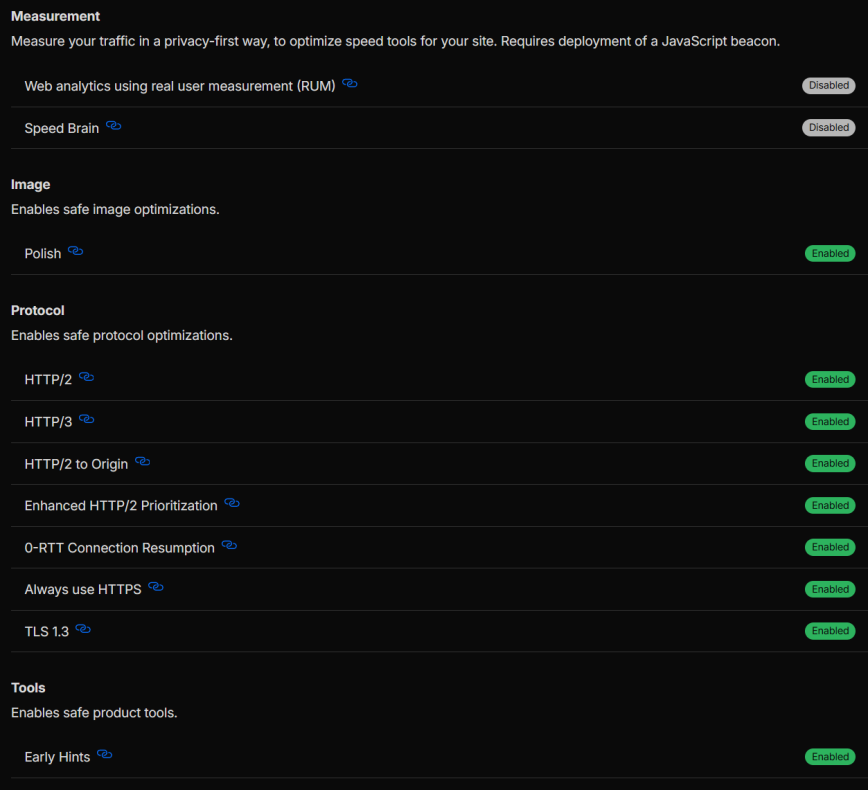
A few Cloudflare settings that aren’t WAF-specific but are critical for Discourse:
- Rocket Loader: OFF. This rewrites JavaScript loading order and consistently breaks Discourse’s Ember.js frontend. The official Discourse guide explicitly warns about this.
- Auto Minify: Deprecated. Cloudflare removed this feature from the dashboard in August 2024. Discourse already serves minified assets in production, so this was never necessary. If it was previously enabled on your zone, turn it off via the API.
- Brotli: ON. Always-on as of mid-2024, no configuration needed.
- HTTP/2 and HTTP/3: ON. Both improve Discourse’s asset loading, especially for the parallel requests during page load. For more on how these protocols affect performance at the server level, see my Nginx TLS Tuning Tips.
- Early Hints: ON. Helps preload critical Discourse assets.
Caching Considerations
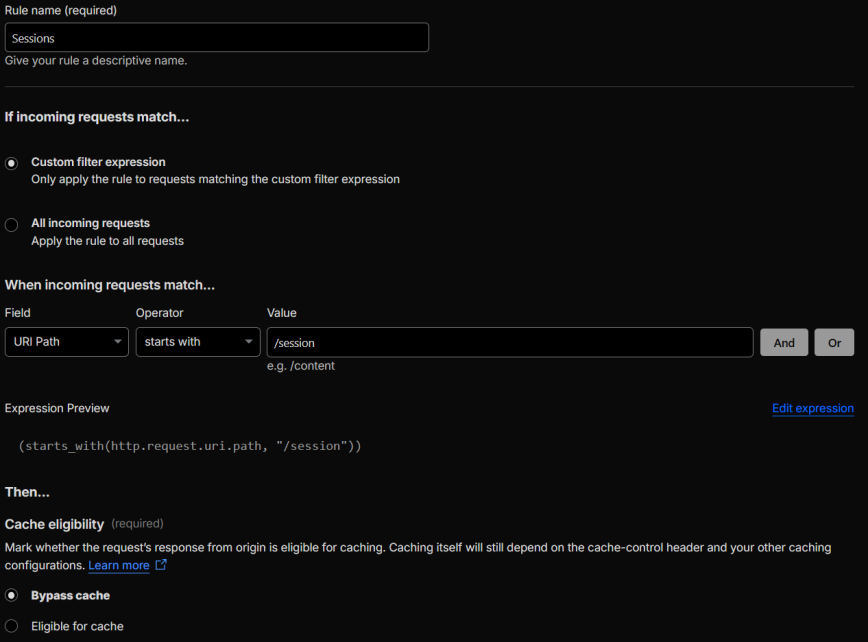
Discourse handles its own cache headers for static assets (long TTLs on fingerprinted filenames). If you’re using Cloudflare Argo for smart routing, your cached assets still benefit from the reduced TTFB on cache misses. The main caching consideration for Cloudflare is to bypass caching on the /session path to prevent login/logout issues. Navigate to Caching > Cache Rules and create a new rule:
(starts_with(http.request.uri.path, "/session"))
Action: Bypass cache.
The official Discourse guide recommends this rule. In practice, Discourse already sends appropriate cache-control headers on /session responses. I’ve run without it for years with no login/logout issues. But added it recently for an extra safety net. I recommend adding it. It won’t affect your cache hit rate in any meaningful way. The /session path handles login/logout/CSRF token requests, which are dynamic, user-specific responses.
Monitoring and Tuning
Deploying rules is the starting point, not the finish line. After your initial setup:
Check Security Events daily for the first week. Look for legitimate users getting blocked (residential ISP IPs with current browser UAs hitting Discourse-specific paths like /message-bus, /t/, /drafts) and bots that are getting through (datacenter IPs with outdated UAs scraping your content).
Watch challenge bypass rates. A healthy Managed Challenge rule should have a 40-70% bypass rate. Significantly lower means you’re mostly catching bots (good). Significantly higher means you’re mostly bothering humans (consider tightening or removing the rule).
Cross-reference with Discourse admin logs. Your Discourse admin panel (/admin) shows user IPs and registration patterns. If users report issues accessing the site, check their IP against your Security Events to see which rule caught them.
Review the Log Remaining Traffic rule. Traffic that reaches your last rule without being caught is traffic your rules aren’t covering. If you see patterns (specific ASNs, paths, or UAs consistently appearing), that’s your signal to create new rules.
If you use a server-level firewall alongside Cloudflare, tools like SELinux or AppArmor add another layer of defense at the OS level, independent of your WAF configuration.
Complete Rule Summary
For reference, here’s the complete rule stack in order:
Free plan users (5 rules max): Drop rules 2 and 7 (optional logging rules), and combine rules 4 and 5 into a single ASN challenge rule. That gives you 4 rules with room to spare.
Plus rate limiting rules (separate section in Cloudflare) and managed rule exceptions (Pro and above).
Disable logging on stable rules
After a couple of weeks or months of investigating and analyzing your Security Events, consider disabling “Log matching requests” on the Discourse Essentials, and Log Remaining Traffic rules. These logging rules generate a high volume of events that are useful during initial tuning but add noise once you have a stable, production-ready ruleset. Keep logging enabled on the block and challenge rules where you actually need ongoing visibility.
Cache hit rate expectations
With everything in place, aim for a cache hit rate of at least 30%. Discourse is a highly dynamic application. Unlike WordPress, even non-logged-in users generate a significant number of uncacheable requests: message-bus polls, CSRF tokens, topic timing updates, and more. A 30% hit rate is healthy for Discourse behind Cloudflare. If you’re seeing significantly less, check that your Discourse Essentials skip rule isn’t preventing Cloudflare from caching static assets it otherwise would.
ASN list maintenance
ASNs change. Not often, but they do. Cloud providers acquire new ranges, VPN services shift infrastructure, and hosting companies merge. I haven’t included a complete listing of all ASNs in this guide for that reason. Instead, I audit the full rule setup every three to six months, reviewing Security Events to confirm the ASN challenge rules aren’t blocking legitimate users and aren’t letting through traffic that should be challenged. Treat your ASN lists as living configuration, not a set-and-forget list.
Is the geo challenge rule necessary?
The Challenge Geo rule (Rule 6) is genuinely optional. Whether you need it depends on your forum’s audience. If your forum is regional or attracts traffic from a specific language community, geo challenges could block the people you’re trying to reach. If your forum is global and you don’t have significant issues with spam or bandwidth waste from specific regions, you may not need this rule at all. Only enable it based on your own Security Events data showing notable automated traffic from specific countries. Don’t copy someone else’s country list.
Conclusion
More than half of all web traffic is now automated. It does not matter if you run a Discourse forum, a WordPress site, or any other web application, a robust web application firewall is no longer optional. It’s a core part of your security, performance, and resource management strategy.
Discourse generates traffic patterns that generic WAF templates aren’t built for: long-polling on /message-bus, hundreds of background requests, and Ember.js frontend assets that break if challenged incorrectly. The rules in this guide account for all of that.
Start with the Discourse Essentials skip rule and the block rule, monitor your Security Events for a week, then layer on ASN and geo challenges based on what your logs actually show. Every forum’s traffic profile is different, so treat these rules as a tested starting point and adjust from there.
The WAF is just one layer. In a future article, I plan to cover Discourse’s own security settings as well as local firewall configuration on the server itself.
References
— Using Discourse with Cloudflare: Best Practices — Official Discourse Guide.
— How do you setup Cloudflare? — Discourse Meta discussion with notes from Sam Saffron on message bus and long polling.
— Recommended Cloudflare Performance & Security Settings Guide — General Cloudflare configuration guide.

Here’s what 5 rules would look like for free Cloudflare plans: