Self-hosted Projects That Earn (Make money from your Home lab)
If you run a home lab long enough, this realization eventually hits you: a lot of your hardware spends more time idle than working. Servers sized for future growth, machines you planned to use for one thing but never quite did, systems that stay powered on 24/7 but barely break a sweat. Thanks to how efficient Linux and modern hardware have become, that unused capacity adds up.
This post is about turning that idle time into something productive. By participating in decentralized networks that actually pay you for contributing real resources like bandwidth, storage, compute, or data. In many cases, once these are set up, they simply run in the background and earn while your lab continues doing what it already does best.
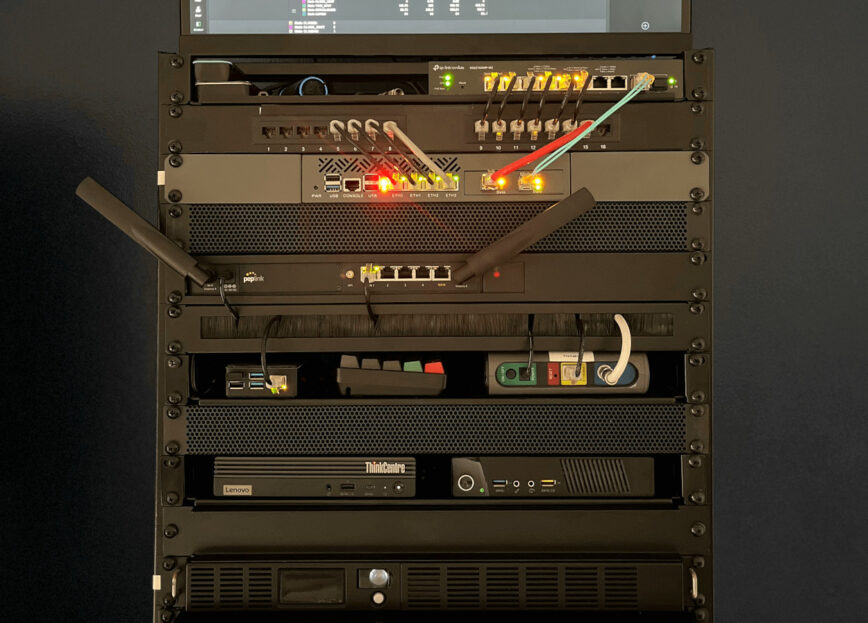
Most recent photo of my 12u home lab: self-hosted projects
Below is a curated list of projects that fit the “earn by existing and staying online” model.
Note: You are rewarded based on actual usage, not just allocating resources; real earnings depend on demand, uptime, and utilization.
Wireless, Sensor, and Real-World Data (DePIN)
These projects focus on gathering real-world data and infrastructure signals, things like wireless coverage, location data, vehicle telemetry, and environmental inputs. You earn by running a node or device that contributes data to a decentralized network, often with rewards tied to uptime, data quality, and geographic usefulness. Requirements vary, but usually include a dedicated device, reliable internet, and, in some cases, specific placement or hardware like antennas, GPS receivers, or vehicle integrations.
- Helium
LoRaWAN and 5G coverage rewards for running hotspot nodes. - DIMO
Vehicle telemetry network. Earn tokens by sharing anonymized car data like mileage and diagnostics. - GEODNET
GNSS/GPS correction network. Run a base station to improve positioning accuracy for drones, mapping, and agriculture. - Hivemapper
Mapping network rewarding contributors for decentralized geospatial data. - Silencio
Environmental audio and noise data network rewarding passive sound sampling.
Search, Indexing, and Data Discovery
Decentralized search and indexing networks reward participants for helping crawl, index, and serve search data without relying on a single centralized provider. In this model, your homelab contributes compute, storage, or routing capacity to keep search infrastructure distributed and resilient. These projects are typically lightweight, friendly to always-on servers, and reward consistency and uptime more than raw horsepower.
- Timpi
Decentralized search engine rewarding infrastructure and indexing nodes. - Presearch
Decentralized search platform rewarding node operators with PRE tokens.
Decentralized Storage Networks
Storage networks let you monetize unused disk space and outbound bandwidth by renting it to a decentralized marketplace. Your data is usually encrypted, split into shards, and distributed across many nodes, so you never store complete files. Earnings depend on available capacity, reliability, and how often your node is selected to serve or retrieve data. Typical requirements include spare storage, steady uptime, and decent upload speeds.
- Storj
Earn by providing encrypted object storage and bandwidth. - Filecoin
Storage and retrieval mining with higher hardware and bandwidth demands. - Sia
Rent unused disk space in a decentralized storage marketplace. - Arweave
Permanent data storage with long-term incentive economics. - IPFS
Content-addressed storage and pinning participation.
Decentralized Compute and Cloud

These platforms turn spare CPU, RAM, and sometimes GPU resources into decentralized cloud infrastructure. Instead of renting from a traditional cloud provider, users deploy workloads across many independent nodes. For homelab operators, this means earning by running containers, virtual machines, or compute jobs in the background. Hardware requirements vary widely, from modest CPUs to high-end GPUs, and rewards generally scale with performance and availability.
- Akash Network
Container-based decentralized cloud compute marketplace. - Golem Network
Rent spare CPU or GPU cycles for distributed workloads. - Flux (RunOnFlux)
Run FluxNodes that provide decentralized cloud services and Docker workloads. - Fluence Network
Decentralized compute marketplace selling CPU and RAM as virtual servers with SLAs. - Bittensor
Token-incentivized AI network where compute contributes to competing ML subnets. - Render Network
GPU-based distributed rendering for creators.
Bandwidth and Network Resource Sharing

Passive bandwidth sharing for data delivery and research.
Bandwidth sharing networks pay you for allowing controlled use of your unused internet capacity. Your connection may be used for things like content delivery, data collection, or research traffic. These projects are usually very easy to deploy and require minimal hardware, but earnings depend heavily on your location, connection quality, and ISP policies. Stable uptime and clean residential IPs tend to matter more than raw speed.
- PacketStream
Monetize unused internet bandwidth via residential proxy routing. - Honeygain
Passive bandwidth sharing for data delivery and research. - Grass
Turn spare bandwidth into AI and web-intelligence data collection rewards.
Messaging, Streaming, and Data Transport
Real-time data transport networks focus on moving messages and event streams between applications in a decentralized way. By running relay or broker nodes, your homelab helps move data reliably across the network. Rewards are typically tied to uptime, bandwidth, and routing reliability, making these a good fit for always-on systems with solid connectivity.
- Streamr
Run broker and relay nodes to route real-time pub/sub data streams. - NKN
Decentralized data transmission network where nodes relay encrypted traffic and earn tokens based on bandwidth and uptime. - Waku
Decentralized messaging protocol used by Web3 apps, rewarding relay and store nodes that provide reliable peer-to-peer message propagation.
Blockchain Infrastructure and Payment Networks
Blockchain infrastructure nodes support the underlying networks that power decentralized finance, payments, and applications. Depending on the network, you may earn through staking, validation rewards, or transaction routing fees. These setups often have higher requirements, such as consistent uptime, fast storage, and strict performance expectations, but they can also provide more predictable reward models for well-maintained systems.
- Ethereum
Validator or infrastructure nodes supporting decentralized finance and apps. - Cosmos
Validator and infrastructure participation across Cosmos-based chains. - Solana
High-performance blockchain validators and RPC infrastructure. - Lightning Network
Bitcoin micropayment routing with fee-based rewards.
Emerging DePIN and Connectivity
These newer projects push the DePIN model further by tying decentralized networks to physical infrastructure like machines, vehicles, IoT gateways, or localized connectivity. They often reward early participants who can provide coverage, data, or uptime in underserved areas. Requirements vary widely, but many start small and scale over time as the network matures.
- peaq Network
Infrastructure and machine nodes powering DePIN apps for vehicles, robots, and IoT. - Dabba
Decentralized Wi-Fi hotspot network rewarding uptime and traffic.
Conclusion
One of the quiet advantages of running a homelab is how much flexibility it gives you. You plan for growth, over-spec a little, and end up with systems that are far more capable than their day-to-day workload demands. Over time, that means powered-on machines, unused disks, idle CPU cycles, and bandwidth that goes untouched.
The projects in this list exist to take advantage of exactly that. They let you put otherwise idle resources to work without changing how you use your lab, and in many cases without needing to actively manage anything once it is running. You are not guaranteed riches, but you are at least giving your hardware a chance to earn instead of just sitting there.
If you already believe in running your own infrastructure, supporting decentralized networks, and getting real value out of the gear you own, this is one of the more practical ways to turn that mindset into something tangible.


Do you use any of this?
Hi @toadie
Yes. Some of them will credit users with cash, tokens, or points when shared. I just didn’t think to do so.
My main limitation is geolocation. Last year I tried to get started with Helium, but living around a small population isn’t that great for many of those listed.
Here are some I use and can recommend (affiliate links provide credit both ways):
– Honeygain—as mentioned location matters, so I make only about $50 a year. Earnings can range from $30 to $300 a year.
– Packetstream.io - also about $50/yr.
The bandwidth usage is noticeable. My ISP upload is 300/Mbps. I run them on my home lab’s Thinkcentre Tiny using Docker containers so they run 24/7.
Honeygain and Packetstream is proven and pays out in cash, while Grass.io is more speculative and pays in crypto.
I’m also on the waitlist for Timpi interested in these nodes:
As you know, I’ve been looking into setting up an NAS in my home lab. I’m hoping for 10TB to 20TB and then I’ll setup Storj or Sia (storage networks) These reward uptime and reliability more than location, which makes them a good regional‑agnostic way to monetize spare disk and outbound bandwidth.
This is a great article and one that I want to look into in the future – so, pinning this one for later. Unfortunately, while I have awesome 1Gbps download I have only 50Mbps upload. So, pretty limiting for anything other than personal use.
I was also worried about my bandwidth. But to be honest, usage has not been noticeable.
That 50 Mbps upload limit sounds tighter than it really is. I’m outside the US, so maybe the bandwidth usage/earnings is higher for locations in North America and Europe. But I’m averaging about 20 GB / day upload split across 2 services. I used multiple because, as mentioned, due to my location, the demand for bandwidth is lower.
If you round it up to 20 GB per day, only works out to about 1.8 to 2 Mbps on average when spread evenly across the day. On a 50 Mbps upload, that is a minimal slice of your available bandwidth and generally not noticeable for normal browsing, Wi-Fi use, or day-to-day internet activity.
That said, this becomes an issue if a service behaves in a spiky way and tries to burst hard for short periods. Most of these bandwidth-sharing services actively try to avoid that, BUT it is still something to plan for.
In my case, I have traffic rules on the router that cap the Lenovo Tiny server’s upload rate. That means even if a workload suddenly spikes, it physically cannot saturate my connection or impact the rest of the network.
You can also limit upload bandwidth for specific Docker containers:
With rate limiting in place, usage like this stays predictable and quiet in the background. You do not need a massive upload pipe for these projects. You mainly just need consistency and a sensible cap so your home network always wins.
What I’ve found is that for home labs where your server is online 24/7 and thus reliable, their systems will increasingly over time send you more and more traffic. lol.
Since the demand is lower in my Caribbean location, I started also using repocket.com while writing the article, so ~ 5 days now. Bandwidth usage is low, but like the others, I belive over time, when their systems detect that my connection has great uptime, the demand will increase:
First 5 days ~ 1 GB; today so far, almost 4 GB.
By running multiple services, it increases the bandwidth use closer to what I would have using just 1 service in North America or Europe.
I’m somewhat wary of the phrase ‘running in the background’. While ostensibly, there’s a process priority system, in practice using the BASH
nicecommand to decrease the priority of theapt updateprocess while watching a video on my Pi, did nothing to reduce the choppiness and stalling of video playback, caused by the load.How can you tell that such processes really are running in the background and not causing detriment to the performance of your own critical processes?