Linux Firewall with nftables: Setup Guide
If you have been running iptables for years, you have probably heard that nftables is replacing it. That transition has been underway for a while now. On modern Debian, Ubuntu, Fedora, and RHEL-based systems, nftables is already the default. Yet most guides still teach iptables syntax, leaving a lot of admins running legacy rules without realizing it.
This nftables tutorial walks through the framework from a practical angle: understanding the structure, writing real rules, persisting them across reboots, and migrating from iptables if that is where you are coming from. No fluff, just a working firewall by the end.
Note: On Ubuntu server images, UFW is often enabled by default. On Debian it is installed but typically not active. If you want to manage nftables directly, disable it first: sudo ufw disable. On RHEL/Fedora systems, do the same for firewalld: sudo systemctl stop firewalld && sudo systemctl disable firewalld. Running UFW or firewalld alongside direct nftables rules will cause conflicts.
Why nftables?
iptables, ip6tables, arptables, and ebtables were four separate tools doing related jobs. nftables replaces all four with a single unified framework. The advantages are real:
- One tool handles IPv4, IPv6, ARP, and Ethernet bridging.
- Rules are compiled into bytecode and evaluated by the kernel more efficiently.
- Atomic rule updates: you can replace an entire ruleset in one operation with no window of exposure.
- Sets and maps let you match against lists of IPs, ports, or interfaces without writing a rule per item.
- The syntax is more readable once you understand the structure.
The Linux kernel has shipped nftables since 3.13. If you are on any modern distro, you already have it. See the official nftables wiki for the full upstream documentation.
What about UFW and firewalld?
UFW and firewalld are not replacements for nftables. On modern systems they commonly manage nftables rules under the hood, though the actual backend varies by distribution and version. The problem is that both tools assume exclusive ownership of the ruleset. If you run nft commands directly alongside them, those rules live outside their tables, will not survive a reload, and may be overwritten. If you run flush ruleset, you wipe their rules entirely.
Disabling them to use nftables directly is a standard pattern on dedicated servers and VPS environments where you need full control, auditability, or features these frontends do not expose: sets, maps, the netdev family. Hetzner’s firewall tutorial explicitly instructs users to disable UFW first as a routine step. For a homelab where you just need to open and close ports, UFW is fine. If you want to follow along without touching a live server, a VM or Docker container works just as well.
Understanding the Core Structure
Before writing a single rule, you need to understand three concepts: tables, chains, and rules. This is where most people get tripped up coming from iptables.
Tables
In iptables, tables like filter, nat, and mangle were predefined and built into the kernel. In nftables, you create your own tables and give them a family. The family determines what traffic they handle.
ip: IPv4 onlyip6: IPv6 onlyinet: both IPv4 and IPv6 (most useful for servers)arp: ARP trafficbridge: traffic traversing a bridgenetdev: ingress/egress on a specific device, before routing decisions are made
For a typical server, you will use the inet family so one table covers both IP versions.
Chains
Chains live inside tables. They can be base chains (hooked into netfilter at a specific point in packet processing) or regular chains (called from rules, like custom chains in iptables).
A base chain needs three things defined: the hook, the type, and the priority. For example:
type filter hook input priority 0;
The hook tells the kernel when to run this chain. Common hooks are input, output, forward, prerouting, and postrouting.
The policy sets what happens to packets that reach the end of the chain without matching any rule. Set it to drop for a default-deny firewall or accept if you prefer to explicitly block.
Rules
Rules sit inside chains. Each rule has a match expression and a verdict. The verdict can be accept, drop, reject, return, or a jump to another chain.
Installing nftables
On most modern systems it is already installed. Check with:
nft --version
If it is missing:
# Debian/Ubuntu
sudo apt install nftables

# Fedora/RHEL
sudo dnf install nftables
Start and enable the service so your ruleset loads on boot:
sudo systemctl enable --now nftables
Note: If you are running ufw or firewalld, those tools manage their own rules. You can still learn nftables directly alongside them, but avoid editing the same chains they manage.
Your First Ruleset: A Practical Server Firewall
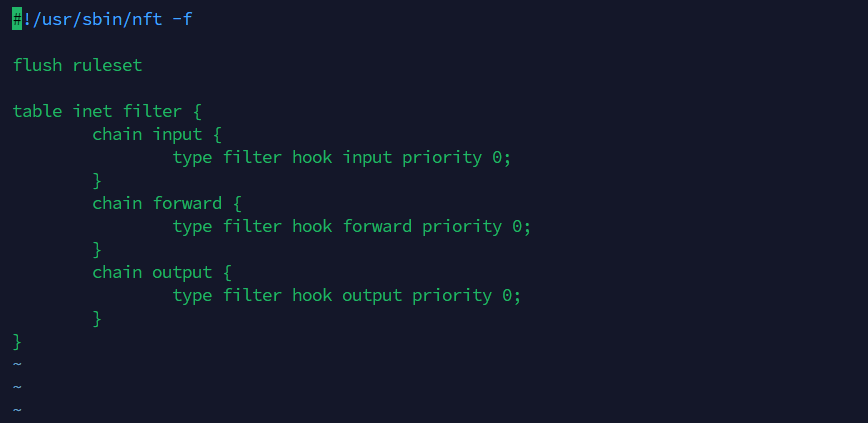
The cleanest way to work with nftables is to write a config file and load it. The default config lives at /etc/nftables.conf.
Here is a solid starting point for a Linux server. It allows established connections, SSH, HTTP, and HTTPS, and drops everything else inbound by default.
#!/usr/sbin/nft -f

flush ruleset

table inet filter {

    chain input {
        type filter hook input priority 0;
        policy drop;

        # Allow loopback
        iif lo accept

        # Drop invalid packets
        ct state invalid drop

        # Allow established and related connections
        ct state { established, related } accept

        # Allow ICMP (ping) - IPv4 and IPv6
        ip protocol icmp accept
        ip6 nexthdr icmpv6 accept

        # Allow SSH
        tcp dport 22 accept

        # Allow HTTP and HTTPS
        tcp dport { 80, 443 } accept

        # Log and drop everything else (optional)
        log prefix "nftables-drop: " flags all drop
    }

    chain forward {
        type filter hook forward priority 0;
        policy drop;
    }

    chain output {
        type filter hook output priority 0;
        policy accept;
    }
}
Load it with:
sudo nft -f /etc/nftables.conf
Verify the active ruleset:
sudo nft list ruleset
Working with Rules at the Command Line
You do not always need to edit the file and reload. For quick changes or testing, you can work with nft directly.
Add a rule
Allow a specific port, say for a custom application on port 8080:
sudo nft add rule inet filter input tcp dport 8080 accept
List rules with handles
To delete a rule you need its handle number. List them like this:
sudo nft -a list chain inet filter input
Output will look like:
table inet filter {
    chain input {
        type filter hook input priority filter; policy drop;
        iif "lo" accept # handle 3
        ct state invalid drop # handle 4
        ct state { established, related } accept # handle 5
        ip protocol icmp accept # handle 6
        ip6 nexthdr ipv6-icmp accept # handle 7
        tcp dport 22 accept # handle 8
        tcp dport { 80, 443 } accept # handle 9
        tcp dport 8080 accept # handle 10
    }
}
Delete a rule by handle
sudo nft delete rule inet filter input handle 10
Insert a rule at the top
Sometimes order matters. Use insert instead of add to prepend a rule:
sudo nft insert rule inet filter input ip saddr 203.0.113.5 drop
Using Sets to Block IPs Efficiently
This is where nftables really shines compared to iptables. Instead of one rule per blocked IP, you define a set and match against it in a single rule. The kernel evaluates sets with a hash or interval tree lookup, so performance stays flat even with thousands of entries.
Define a named set of blocked addresses:
sudo nft add set inet filter blocklist { type ipv4_addr\; }
Add addresses to it:
sudo nft add element inet filter blocklist { 198.51.100.1, 198.51.100.2, 198.51.100.50 }
Add a rule that drops traffic from the set:
sudo nft insert rule inet filter input ip saddr @blocklist drop
You can also define sets inline in your config file. Here is an example that allows SSH only from trusted IPs:
set trusted_ssh {
    type ipv4_addr;
    elements = { 192.168.1.10, 10.0.0.5 };
}

chain input {
    ...
    tcp dport 22 ip saddr @trusted_ssh accept
    tcp dport 22 drop
    ...
}
This pattern is cleaner and faster than a long list of individual rules. See the ss command guide if you need to verify which ports are actually listening before writing your rules.
NAT with nftables
If your server is acting as a router or you need masquerading for a home lab, nftables handles NAT cleanly. Add a nat table alongside your filter table:
table ip nat {
    chain prerouting {
        type nat hook prerouting priority -100;
    }

    chain postrouting {
        type nat hook postrouting priority 100;
        oifname "eth0" masquerade;
    }
}
Replace eth0 with your actual outbound interface name. You can find it with ip link show or check the Linux networking commands and scripts reference.
Port forwarding is also straightforward. Forward external port 2222 to an internal host on port 22:
table ip nat {
    chain prerouting {
        type nat hook prerouting priority -100;
        tcp dport 2222 dnat to 192.168.1.20:22;
    }

    chain postrouting {
        type nat hook postrouting priority 100;
        oifname "eth0" masquerade;
    }
}
Rate Limiting to Reduce Brute Force
You can apply rate limits directly in rules without a separate tool. This example limits new SSH connection attempts to 5 per minute globally on that rule, dropping excess attempts:
tcp dport 22 ct state new limit rate 5/minute accept
tcp dport 22 ct state new drop
Add those two lines to your input chain before any unconditional SSH accept rule. This will not stop a determined attacker, but it kills off the bulk of automated scanners. Combine it with a restricted source IP set for production servers where you control the source addresses. For more on locking down SSH access, see SSH Security: Protecting Your Linux Server from Threats.
Persisting Rules Across Reboots
Any rules you add with nft directly are lost on reboot. Two options:
Option 1: Edit /etc/nftables.conf directly, then reload:
sudo nft -f /etc/nftables.conf
Option 2: Save the current live ruleset to the config file:
sudo nft list ruleset | sudo tee /etc/nftables.conf
Then make sure the service is enabled:
sudo systemctl enable nftables
On boot, systemd will run nft -f /etc/nftables.conf automatically. No iptables-save or iptables-restore wrappers needed.
Migrating from iptables
If you have existing iptables rules you want to carry over, the iptables-translate utility can convert them one at a time:
iptables-translate -A INPUT -p tcp --dport 443 -j ACCEPT
Output:
nft add rule ip filter INPUT tcp dport 443 counter accept
To translate a full saved ruleset:
sudo iptables-save | sudo iptables-restore-translate -f /etc/nftables.conf
Review the output carefully before using it. The translation is usually accurate but may need cleanup, especially around complex rules with multiple modules. The translated rules will also use the ip family by default, so you will want to consolidate into an inet table manually if you also have ip6tables rules to migrate. See the nftables migration guide on the upstream wiki for a thorough walkthrough of edge cases.
Once you have confirmed everything works, stop and disable the legacy services:
sudo systemctl stop iptables
sudo systemctl disable iptables
Note: Some distros ship a compatibility layer where iptables commands actually write to nftables under the hood (via iptables-nft). Check which binary you are using with update-alternatives --display iptables on Debian-based systems.
Debugging and Troubleshooting
A few commands that save time when something is not working as expected.
List the full active ruleset:
sudo nft list ruleset
List just one table:
sudo nft list table inet filter
Check that your config file has no syntax errors before loading it:
sudo nft -c -f /etc/nftables.conf
The -c flag runs a dry-check without actually applying anything. Use this before every reload on a remote server where a bad rule could lock you out.
Add the counter keyword to any rule to track how many packets it is matching:
tcp dport 22 counter accept
Run sudo nft list ruleset and you will see packet and byte counts next to that rule. Useful for confirming a rule is actually being hit.
If you have the log rule at the bottom of your input chain, you can watch drops in real time:
sudo journalctl -kf | grep nftables-drop
For deeper tracing, nft monitor shows rule events and packet decisions as they happen:
sudo nft monitor
This is useful for confirming that a rule is actually matching the traffic you expect. See the Linux Updates: Command Line Guide for keeping your system and nftables package current, and check out Linux server performance: Is disk I/O slowing your application? …if your firewall logging is generating high write load on a busy server.
A Complete Production-Ready Config
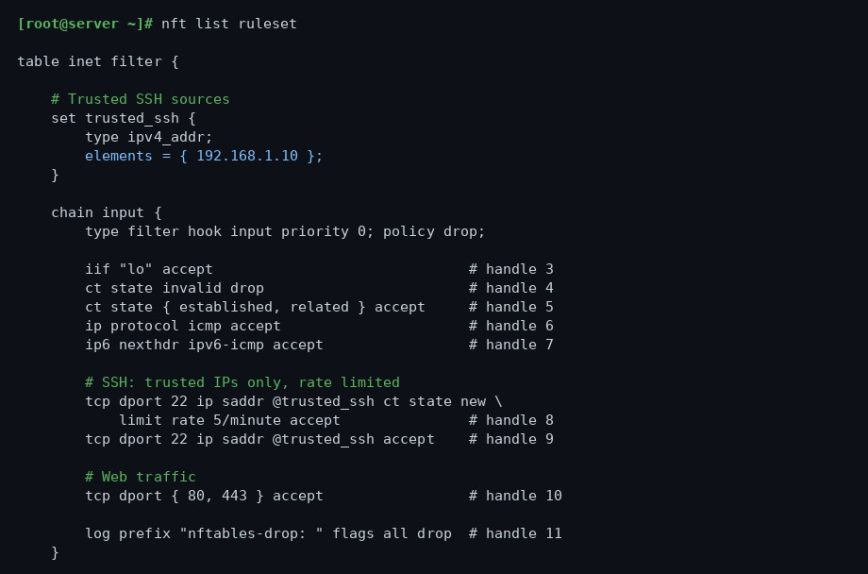
Putting it all together. This is a complete /etc/nftables.conf for a typical web server with SSH access restricted to a trusted IPv4 set and rate limiting on new SSH connections. If you also need IPv6 SSH access, add a separate ip6_addr set and corresponding rule:
#!/usr/sbin/nft -f

flush ruleset

table inet filter {

    set trusted_ssh {
        type ipv4_addr;
        elements = { 192.168.1.10 };
    }

    chain input {
        type filter hook input priority 0;
        policy drop;

        iif lo accept
        ct state invalid drop
        ct state { established, related } accept

        ip protocol icmp accept
        ip6 nexthdr icmpv6 accept

        # SSH: trusted IPs only, rate limited for new connections
        tcp dport 22 ip saddr @trusted_ssh ct state new limit rate 5/minute accept

        # Web traffic
        tcp dport { 80, 443 } accept

        limit rate 10/minute log prefix "nftables-drop: " flags all drop
    }

    chain forward {
        type filter hook forward priority 0;
        policy drop;
    }

    chain output {
        type filter hook output priority 0;
        policy accept;
    }
}
Load it, verify it, and save it. Adjust the trusted SSH set and open ports to match your environment. The log rule is rate-limited to 10 per minute to keep it from flooding the journal on a busy server.
Conclusion
nftables has been production-ready for years. The learning curve coming from iptables is real but not steep, and the payoff is a cleaner, faster, and more maintainable firewall. One config file, one tool, and atomic reloads that do not leave a gap in your rules.
Start with the template above, restrict SSH to known IPs if at all possible, and add the services your server actually needs. Everything else drops by default. That philosophy alone handles the vast majority of threat surface reduction on a Linux server.
If you want to go further, combining nftables sets with a log parser or a script that auto-populates your blocklist from journalctl output is straightforward. The set-based approach makes it practical in a way that iptables never really was. For related server hardening reading, the Linux Commands Frequently Used by Linux Sysadmins series is a good companion reference. The nftables Wikipedia page also has a solid overview of the architecture if you want to go deeper on the kernel internals.
