How to fix: At least xMB more space needed on the /boot filesystem
Running sudo dnf upgrade in Fedora CentOS or RHEL will sometimes result in the following error: At least xxMB more space is needed on the /boot filesystem. Let’s fix this!
List all installed kernel packages with:
yum list kernel
On Fedora 22+, CentOS Stream and RHEL 8+, use:
dnf list kernel
The kernel in use will be underlined and cannot be removed:
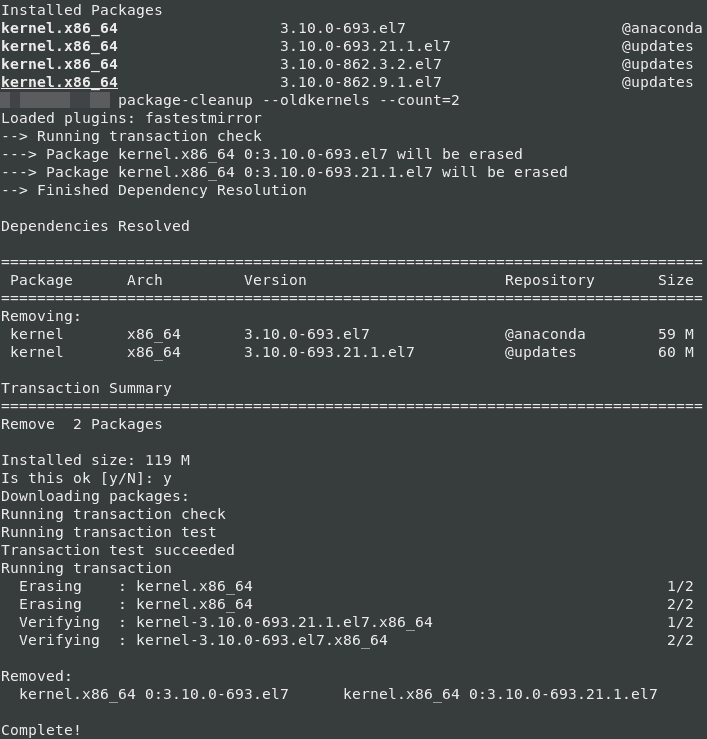
Now to remove unused kernels, install the yum-utils (or dnf-utils) package and use the package-cleanup util:
yum install yum-utils
package-cleanup --oldkernels --count=2
To make this permanent, edit /etc/yum.conf and add the following line:
installonly_limit=2
On RHEL8/CentOS 8/stream, use:
dnf remove --oldinstallonly --setopt installonly_limit=2 kernel
– – – – – – – – – – – – – – – – – – – – — – – – – – – – – – – – – – – – – – – – — – – – – – – – – – – – – – – – – – – – –
The original article from 2017:
While updating a client’s CentOS 6 server using “yum update” I ran into the following error:
Transaction Check Error: installing package kernel-2.6.32-358.2.1.el6.x86_64 needs 11MB on the /boot filesystem
Error Summary
Disk Requirements: At least 11MB more space needed on the /boot filesystem.
To check the free space on /boot I ran the following command: df -h
Which gave the following output:
Filesystem Size Used Avail Use% Mounted on
/dev/vda3 136G 60G 70G 46% /
tmpfs 5.3G 0 5.3G 0% /dev/shm
/dev/vda1 99M 77M 17M 82% /boot
/usr/tmpDSK 1.3G 35M 1.2G 3% /tmp
As you can see the boot partition is 82% full.
To list installed kernels use this command:
rpm -qa | grep kernel
The result:
kernel-2.6.32-220.7.1.el6.x86_64
kernel-headers-2.6.32-358.2.1.el6.x86_64
dracut-kernel-004-303.el6.noarch
kernel-2.6.32-279.19.1.el6.x86_64
kernel-firmware-2.6.32-358.2.1.el6.noarch
kernel-2.6.32-279.9.1.el6.x86_64
So to remove the oldest kernel, I ran:
rpm -e kernel-2.6.32-220.7.1.el6.x86_64
Then: df -h
Output:
Filesystem Size Used Avail Use% Mounted on
/dev/vda3 136G 60G 70G 46% /
tmpfs 5.3G 0 5.3G 0% /dev/shm
/dev/vda1 99M 52M 42M 56% /boot
/usr/tmpDSK 1.3G 35M 1.2G 3% /tmp
As you can see that freed up more than the 11MB needed. So I retried yum -y update kernel and this time it works. Finally, I deleted the old ones again:
rpm -e kernel-2.6.32-279.9.1.el6.x86_64 kernel-2.6.32-279.19.1.el6.x86_64
The final result, 70M free!.
/dev/vda1 99M 25M 70M 26% /boot
Last updated: Aug 13th, 2023